User Manual: WaveLinx Lite (1.5)
Modify Wallstations
Wallstations can be modified to allow for a more descriptive name and different command actions.
Rename Wallstation
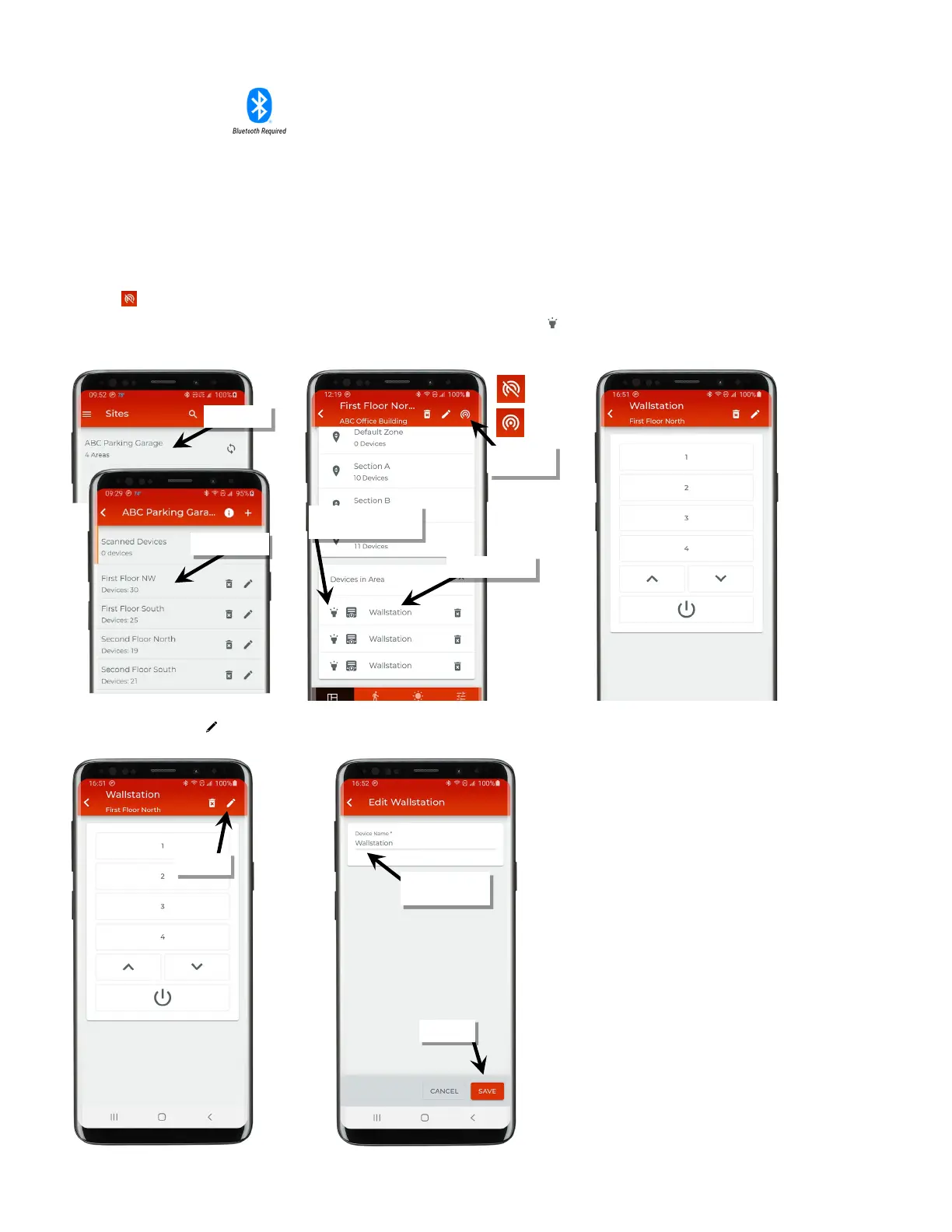
To modify a wallstation:
1: Bring the mobile device within range (within 60 feet) of any provisioned WaveLinx Lite device in the desired area.
2: Ensure that the mobile device Bluetooth is turned on, and then open the WaveLinx Lite Mobile Application.
3: In the site list, select a site.
4: In the area list, select the desired area. After a short delay, verify that the area shows that the mobile application is connected to the network.
Tap on the icon if it is necessary to refresh the connection.
5: In the ‘Devices in Area’ list, locate the wallstation. If needed, use the identify icon ‘ ‘ to flash the wallstation LED until the correct one is
identified. Tap on the wallstation to open it for configuration. The mobile application will display the wallstation configuration on the screen
1
.
6: Tap on the pencil icon ‘ ’ at the top of the screen and type a unique name for the wallstation. Tap ‘Save’.
Verify network
connection
If needed, use ‘identify’ to
locate the correct device



 To Next Page