Introduction i-on16
Page 4
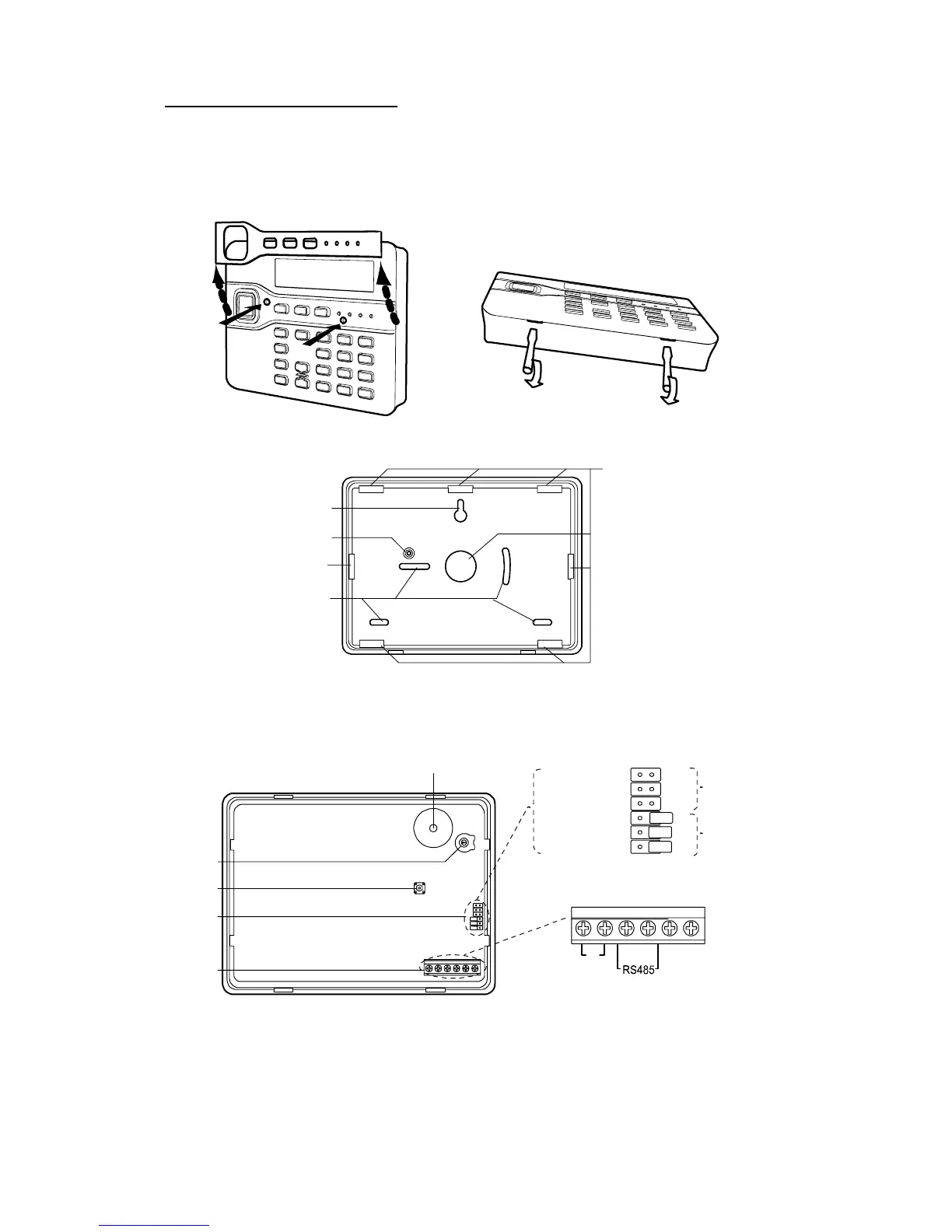
Opening the Keypad
To open the keypad first gently prise off the trim on the
front and remove the two screws. Next, carefully lever
the front of the keypad (containing the pcb and display)
away from the keypad rear housing.
Figure 4. Opening the Keypad
2
4
3
3
1
1. Central keyhole. 3. Cable entry.
2. Rear tamper shroud. 4. Fixing holes.
Figure 5. Keypad Rear Housing
1
4a
4b
3
4
5
2
4
3
2
ABCD-ON
ON
BRIGHT
BACKLIGHT
ET B A 12V 0V
1. Sounder. 4. Jumpers for addressing and LED function:
2. Sounder volume control. 4a Addressing
3. Tamper switch. 4b LED functions
5. Connector for end station.
Figure 6. Keypad PCB


 To Next Page