5
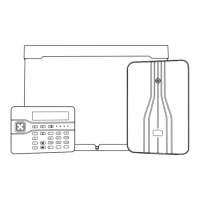
Keypad Features
1. Display:
Display:Display:
Display: Shows the date and time, a
banner message (configured by your
alarm company
1
) and other system
messages.
2. Green power indicator:
Green power indicator:Green power indicator:
Green power indicator: Glows steadily
when power is present.
3. Func
FuncFunc
Function indicator:
tion indicator:tion indicator:
tion indicator: By default, this
indicates that there is more than one
outstanding alert to reset (page 15). The
indicator can be programmed by an
engineer
2
to show other conditions.
4. Keys:
Keys:Keys:
Keys: Accept instructions for operating
the alarm system.
5. Cover:
Cover:Cover:
Cover: Folds down to reveal the keys
and brief operating instructions.
1
Engineer option 1-7 or User option 1-7
2
Engineer option 1-4; by changing keypad output to follow an event other than "Pending"



 To Next Page