- 6 -
EN
GPS Positioning
Start a Ride
Start a Ride
1. For the initial satellite positioning, please wait 30-90 seconds in an open outdoor area. The date and time of the
device will be set automatically after the initial positioning is successful.
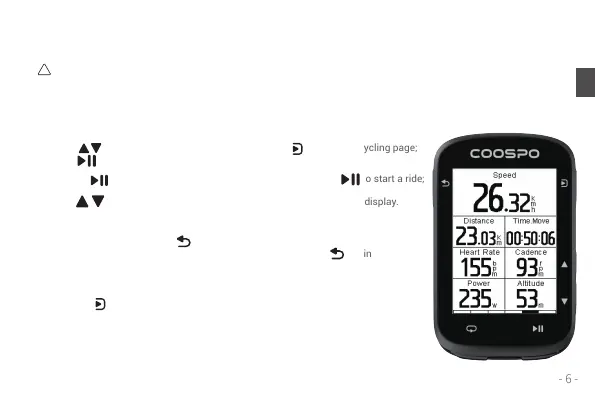
Press on the homepage to select Cycling, press to enter the cycling page;
press to start a ride;
Or press from any page to enter the cycling page, then press to start a ride;
Press at the cycling page to change the data pages you want to display.
After starting the ride, press to access the status page where you
can check the current status and adjust device settings. Press again
to return to the cycling page.
Pressing on the cycling page accesses the ride function menu for
adjusting and setting various functions within the current ride mode.
2. Please ensure that the bike computer remains stationary while it acquires the GPS signal for the best satellite
reception.
Status Page:
Function Menu:
!


 To Next Page