- 5 -
EN
Add Sensor Management
The device can pair with the Bluetooth or ANT+ sensors.
Check sensor compatibility list for more info:
www.coospo.com/faq
Add Sensors in Bike Computer
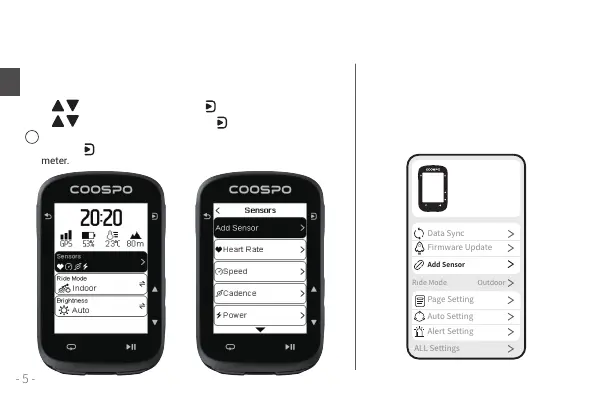
Settings > Sensors > Add Sensor, or Status Page > Sensors > Add Sensor;
Press to select sensor type, press to start searching;
Press to choose the sensor ID, press to add a sensor.
After adding speed/power sensors, check the connected sensors
and click to set the wheel circumference/calibrate the power
meter.
Add Sensors by APP
Open CoospoRide APP > Device > Add
Sensor , search the sensor you want to add,
choose the device ID to add the sensor.
!
CS500
CS500-xxxxxxx


 To Next Page