RIGHT
LEFT
TAPE IN A1 A2
PHONO
GND
LEFT SPEAKER RIGHT SPEAKER
BALANCED INPUT
LEFTRIGHT
AC POWER.
MAX POWER CONSUMPTION. : 600W
RISK OF ELECTRIC SHOCK
DO NOT OPEN
MADE IN DENMARK
C O P L A N D
CAUTION !
CSA 100
SERIAL NUMBER :
+ +
_ _
USB
PRE-OUTTAPE OUT
LINE INPUTS OUTPUTS DIGITAL INPUTS
COAXIAL
MM
AC POWER INLET
OPTIC.1 OPTIC.2
50/60 Hz.
VOLTAGE:
ANTENNA
INTEGRATED AMPLIFIER
RESET
O
1 3 4 5
7
8 9 11
2
14
1512 13
10
5 6
7
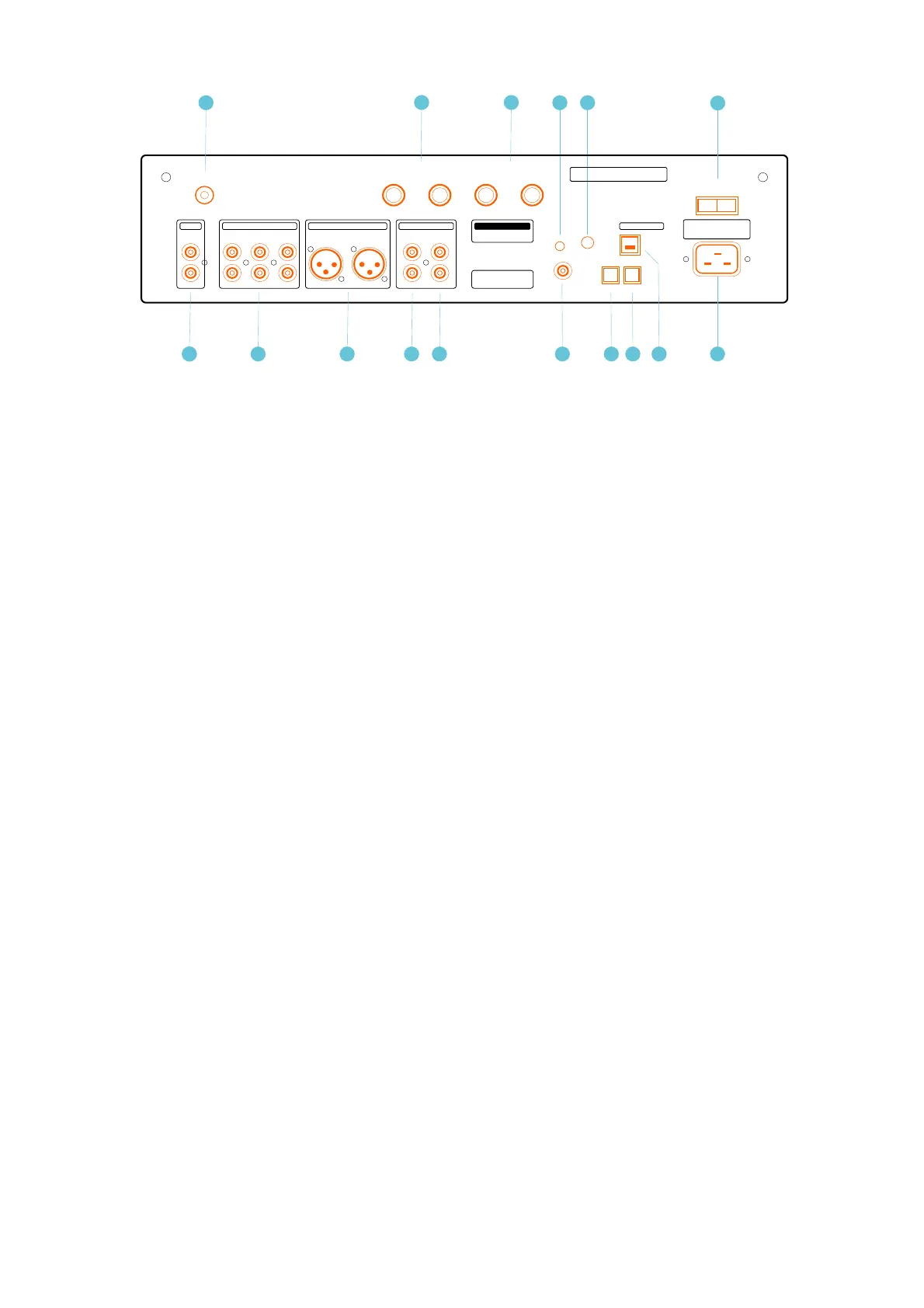
1. Phono/RIAA Section: Accepts input from a Turntable. / MM magnetic pickup (cartridge)
2. Ground: Earth connection for any device that needs to be grounded.
3. A1, A2, TAPE IN: Standard analog inputs.
TAPE IN: Connects with the playback outputs of a tape recorder.
4. Balanced Input: Balanced analog input.
5. Tape Out: (Line Out) The record output jack permits recording directly any signal being
reproduced by the amplifier.
6. Pre-Out:
7. Speaker Output Terminals: Left & Right Channel.
! Note: Signal phase are inverted at the speaker terminals - se the information on page 4.
8. Coaxial input: S/PDIF (Sony/Philips Data Interface) input from a CD player.
It is a single ended square wave of amplitude around 0.5 V pp.
9. Optical input 1: TOSLINK - fibre optic transmission of S/PDIF.
10. Optical input 2: TOSLINK - fibre optic transmission of S/PDIF.
11. USB Input: Use a certified USB2.0 cable. Connect the cable to the CSA100 amplifier
and then to the external USB source.
12. Reset Button: (Optional Extra. Copland aptX HD Bluetooth board)
13. Antenna: Connector for SMA Antenna. (Optional Extra. Copland aptX HD Bluetooth)
14. AC Power connector: 115V/120V/230V/240V AC, depending on country.
! Check that your supply voltage is the same as indicated on the back panel.


 To Next Page