78
3
4
Assembly Chart 1240/1204
shelves
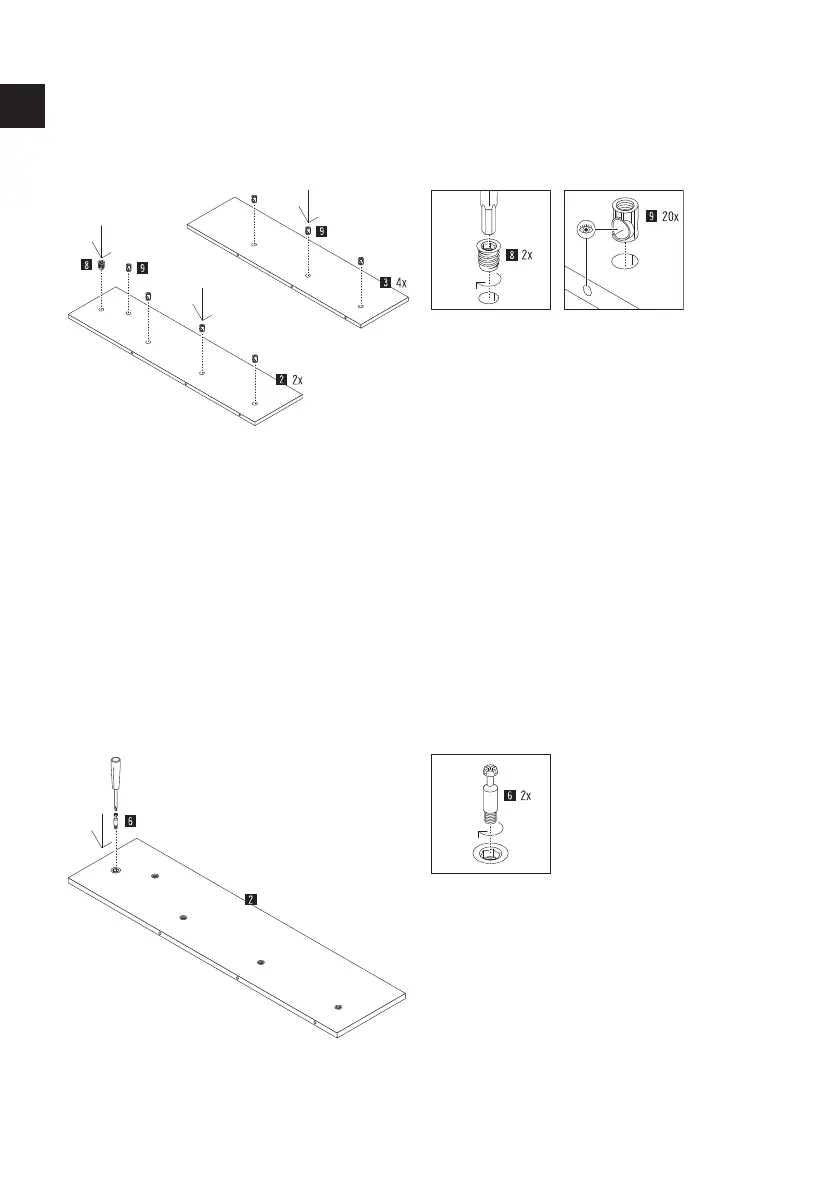
Carefully screw the insert nut (part 8) straight
into the hole provided in the shelf (part 2)
using a cordless screwdriver with an Allen bit.
Insert 4 connector housings (part 9) into the
holes provided in the shelf (part 2) and 3
connector housings (part 9) into the 2 shelves
(part 3). Make sure that the side holes in the
housings are aligned with the side drill holes.
TIP: Check the correct position with the help
of a shelf bolt by inserting it into the side hole
for testing and then pulling it out again.
Insert a Maxifix bolt (part 6) into the shelf
(part 2) with a Phillips screwdriver into the
insert nuts (part 10) provided for this purpose.
GB



 To Next Page