
 Need help?
Do you have a question about the Corsair HS65 SURROUND and is the answer not in the manual?
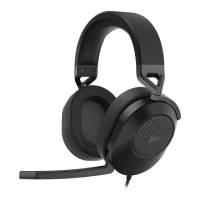
Identifies the Corsair HS65 Surround headset, 7.1 surround sound USB adapter, and microphone.
Explains stereo mode connectivity via 3.5mm jack to PC, Mac, PS4, PS5, Switch, and mobile devices.
Details using the USB adapter for virtual 7.1 surround sound on PC and power requirements.
Guidance on placing and adjusting the headband for a comfortable and fatigue-free fit.
Instructions to download CORSAIR iCUE software from corsair.com/support/downloads for full features.
Enables custom EQ settings, 7.1 surround sound control, and SoundID audio personalization.
Notes that some features will be disabled if the headset is used without iCUE software.
Explains adjusting volume via the headset controller or Windows audio settings.
Instructions on how to mute/unmute the microphone and bend the boom for optimal voice capture.
Encourages using the software equalizer and mentions provided presets for gaming and media.
Advises taking breaks and starting at low volumes to prevent hearing damage from prolonged use.
 General
| Cable length | 1.5 m |
|---|---|
| Control type | Rotary |
| Product type | Headset |
| Product color | Carbon |
| Wearing style | Handheld |
| Control unit type | On-ear control unit |
| Recommended usage | Gaming |
| 3.5 mm connector | Yes |
| Connectivity technology | Wired |
| Impedance | 32 Ω |
| Driver unit | 50 mm |
| Magnet type | Neodymium |
| Ear coupling | Supraaural |
| Headphone frequency | 20 - 20000 Hz |
| Headphone sensitivity | 111 dB |
| Microphone type | Boom |
| Microphone frequency | 100 - 10000 Hz |
| Microphone sensitivity | -40 dB |
| Microphone input impedance | 2200 Ω |
| Audio adapters included | USB |
| Harmonized System (HS) code | 85183000 |
 Weight and Dimensions
| Weight | 282 g |
|---|


 To Next Page