MOBILTEX® DATA LTD.
Calgary, Alberta
www.corTalk.com
TITLE: uDL1 Configuration and Operation Guide
DOCUMENT NO.:
UDL1-MAN-001
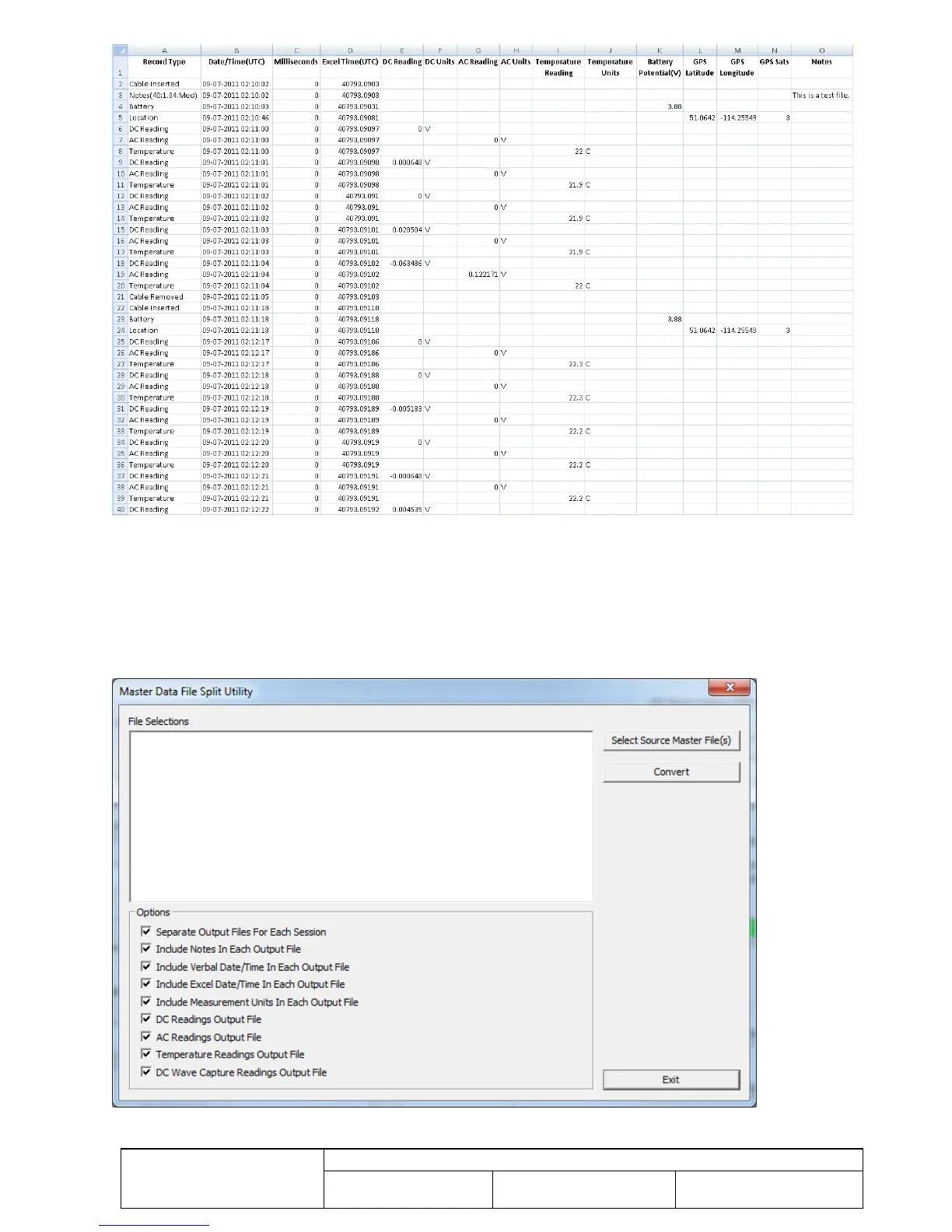
Figure 17 Sample Master Data File
The “Master Data File Split Utility” button invokes a utility function that is used to further process the data from the
uDL1 for use in other analysis applications. The function allows a master data file to be split into separate output files
for DC, AC, temperature, and DC wave readings. As well, separate files can be created for different recording sessions.
Click the “Select Source Master File(s)” button to select the master files to be converted. Next, set the output file options
check boxes as required. Finally, click the “Convert” button. The utility function will create the new output files in the
same directory as the source, but with new extensions to the source file name.
Figure 18 Master Data File Split Utility


 To Next Page