EasyManua.ls Logo

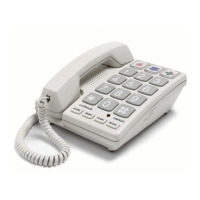
Cortelco ez TOUCH - User Manual

Cortelco ez TOUCH
15 pages
Print Icon
To Next Page IconTo Next Page
Loading...
OWNER’S
INSTRUCTION MANUAL
MULTI-FEATURE TELEPHONE
Question and Answer IconNeed help?

Do you have a question about the Cortelco ez TOUCH and is the answer not in the manual?

Summary

Important Safety Instructions

Telephone Usage and Setup

Setup and Installation Guide

Guide on connecting the telephone line cord and setting up the unit.

Wall Mount Instructions

Steps for mounting the telephone on a wall.

Telephone Part Identification

Telephone Features Overview

Dialing and Call Handling

Covers dialing methods, making calls, and redialing functions.

Call Reception and Indicators

Explains how to receive calls and use the visual ring indicator.

Accessibility and Connectivity Features

Details Braille characters and the data port.

Advanced Telephone Features

Call Waiting and Volume Controls

Instructions for using the flash button and volume controls.

Memory Storage and Dialing

Guide to storing, using, and erasing numbers in memory.

Telephone Service and Troubleshooting

Troubleshooting Common Issues

Addresses problems like no ring, no dial tone, or dialing errors.

Maintenance and Care

Provides advice on cleaning and maintaining the telephone.

Telephone Repair and Warranty Information

Repair and Return Procedures

Instructions for returning the telephone for repair or replacement.

FCC Compliance Information

Details FCC regulations, registration, and equivalence numbers.

FCC Regulations and Restrictions

Ringer Equivalence Number (REN)

Explanation of REN and its impact on connecting devices.

Installation and Operation Compliance

Covers installation requirements, hearing aid compatibility, and FCC rules.
Limited Warranty Details

Cortelco ez TOUCH Specifications

General IconGeneral
BrandCortelco
Modelez TOUCH
CategoryTelephone
LanguageEnglish

Related product manuals