FREQUENTLY ASKED QUESTIONS
8
Disposal instructions
Waste electronic equipment should be
separated from your normal household
waste and taken to your local recycling
centre for disposal, or back to where you
bought the equipment. Proper recycling of
electronic equipment will help the environment..
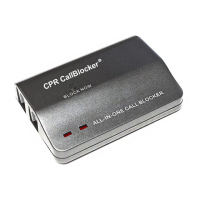
Q. The red lights are not showing on my call blocker?
A. If you have the Call Blocker connected up using LINE 1 and TEL 1 and are unable to
display the red lights then switch the cables over to the LINE 2 and TEL 2 ports. The
same goes if you have the cables in the LINE 2 / TEL 2 ports, switch them over to the
LINE 1 / TEL 1 ports.
Please note that the red lights only display when the phone has a dial tone.
Q. I am unable to enter the programming codes?
A. Some telephone line providers network codes conict with the call blocker’s
* *
command. To overcome this get a dial tone and hold the BLOCK NOW button for 5 secs.
This will set the Call Blocker into programming mode and allow codes to be entered.
Q. Do I need caller ID for this product to work?
A. Yes, caller ID should be enabled on your telephone line for the product to work
effectively.
Q. Can I use any telephone with the CPR Call Blocker?
A. The CPR Call Blocker will work with a wide range of modern telephone equipment -
cordless DECT phones , corded phones and cordless analogue phones.
Q. Will the CPR Call Blocker work with my internet connection?
A. Yes, the CPR Call Blocker will work alongside all types of ADSL, DSL and Fibre optic
connections.
Q. Can I use the CPR Call Blocker with extension telephone sockets?
A. Yes, you can but problems can arise. The CPR Call Blocker is designed to work on one
telephone socket (main socket). If you wish to have additional phones around the
house it’s best to use a DECT (Digital Enhanced Cordless Telephone) setup with multiple
cordless handsets so that the Call Blocker can protect all the phones connected to the
base station at the main socket.
Q. The red lights are not showing on my call blocker?
A. If you have the Call Blocker connected up using LINE 1 and TEL 1 and are unable to
display the red lights then switch the cables over to the LINE 2 and TEL 2 ports. The
same goes if you have the cables in the LINE 2 / TEL 2 ports, switch them over to the
LINE 1 / TEL 1 ports.
Please note that the red lights only display when the phone has a dial tone.
Q. I am unable to enter the programming codes?
A. Some telephone line providers network codes conict with the call blocker’s
* *
command. To overcome this get a dial tone and hold the BLOCK NOW button for 5 secs.
This will set the Call Blocker into programming mode and allow codes to be entered.
Q. Do I need caller ID for this product to work?
A. Yes, caller ID should be enabled on your telephone line for the product to work
effectively.
Q. Can I use any telephone with the CPR Call Blocker?
A. The CPR Call Blocker will work with a wide range of modern telephone equipment -
cordless DECT phones , corded phones and cordless analogue phones.
Q. Will the CPR Call Blocker work with my internet connection?
A. Yes, the CPR Call Blocker will work alongside all types of ADSL, DSL and Fibre optic
connections.
Q. Can I use the CPR Call Blocker with extension telephone sockets?
A. Yes, you can but problems can arise. The CPR Call Blocker is designed to work on one
telephone socket (main socket). If you wish to have additional phones around the
house it’s best to use a DECT (Digital Enhanced Cordless Telephone) setup with multiple
cordless handsets so that the Call Blocker can protect all the phones connected to the
base station at the main socket.


 To Next Page