EasyManua.ls Logo

Cradlepoint AER3100 - Page 40

Cradlepoint AER3100
104 pages
Print Icon
To Next Page IconTo Next Page
To Previous Page IconTo Previous Page
Loading...
©2015 Cradlepoint. All Rights Reserved. | +1.855.813.3385 | cradlepoint.com
40
User Manual / AER3100/AER3150
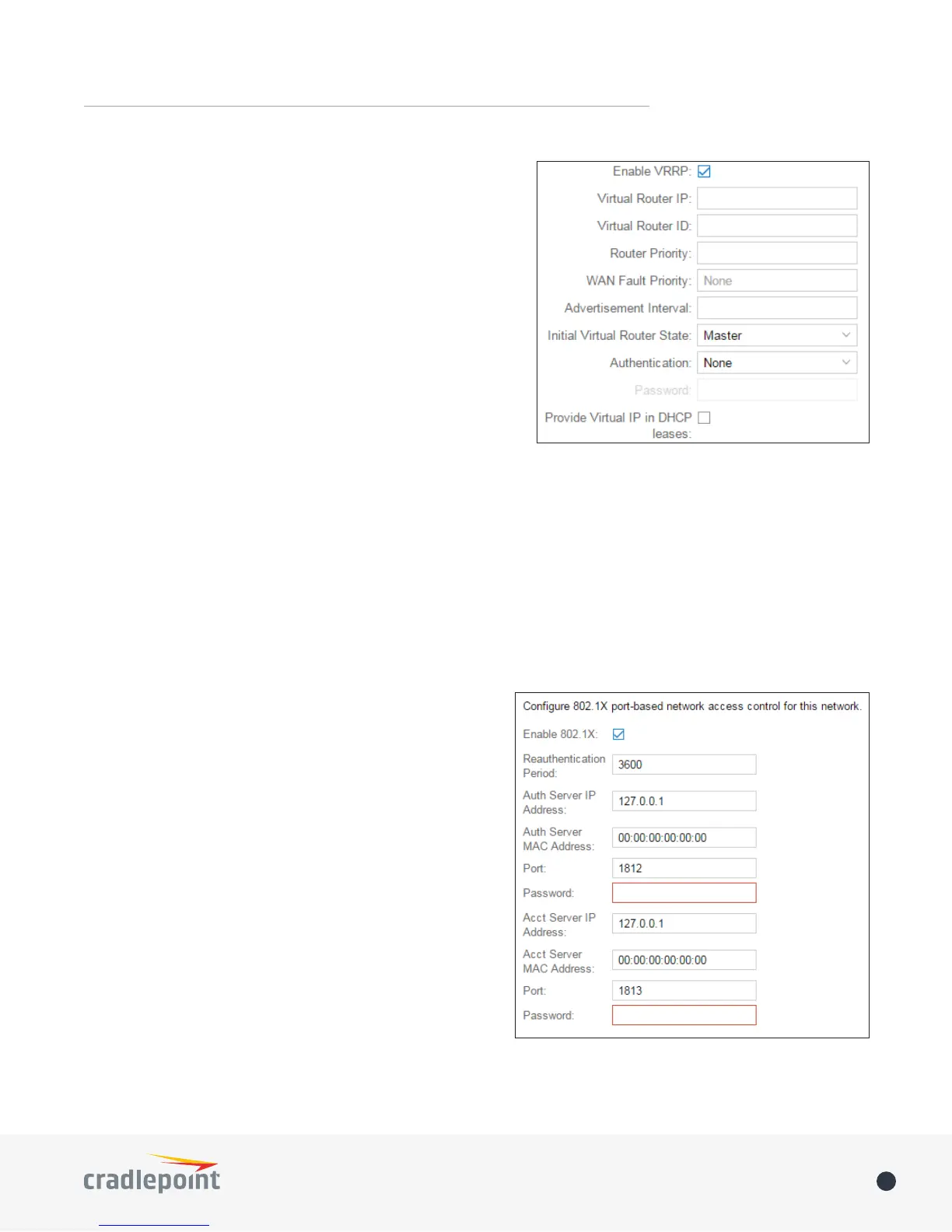
Virtual Router IP: 
Virtual Router ID: 
Router Priority:

WAN Fault Priority:





Advertisement Interval: Sets the amount of time (in seconds)

Initial Value Router State:

Authentication:

Password:
Provide Virtual IP in DHCP leases:

STP
Enable STP: Enable Spanning Tree Protocol
Bridge Priority: 



Wired 802.1X
Enable 802.1X:
Reauthentication Period:

Auth Server IP Address: IP address of the connected RADIUS

Auth Server MAC Address: Hardware address of the
NOTE: If you don’t
know the MAC address for the RADIUS server, enter
00:00:00:00:00:00, and the service will try to find the MAC
address from the given IP address.
Port
Password
Acct Server IP Address: IP address of the connected RADIUS

Acct Server MAC Address: This is the Hardware address
NOTE: If you
don’t know the MAC address for the RADIUS server, enter
00:00:00:00:00:00, and the service will try to find the MAC
address from the given IP address.
Port
Password