05
06
Controls
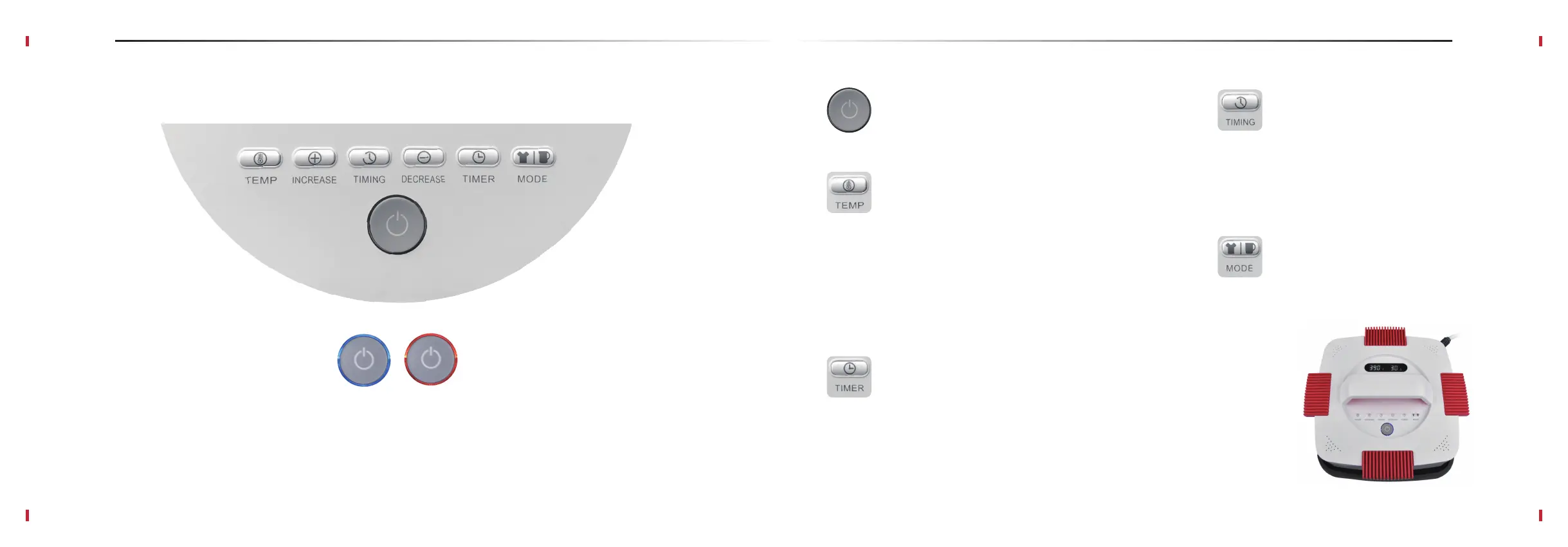
ON/OFF Power Button
1 . Press to power on or off Artista transfer press.
TEMP Button
1 . Press TEMP button to enter the temperature settings mode.
Temperature digits begin to flash on the display.
2. Press “+” and “-” buttons to select the desired temperature for
your transfer. Tip: Press and hold the buttons for fast 10-digit
increments or decrements.
3. Press TEMP button again to save the current setting.
5 . Press and hold the TEMP button if you need to switch
temperature scale from Fahrenheit to Celsius.
TIMER Button
1 . Press TIMER button to enter timer settings mode. Timer
digits begin to flash on the display.
2 . Use “+” and “-” buttons to select the desired press time for
your transfer. Tip: Press and hold the buttons for fast 5-digit
increments or decrements.
3 . Press TIMER button again to save the settings.
TIMING Button
1 . Press TIMING button for the timer countdown
to start. The countdown is shown on the display.
2 . Beep sound indicates the countdown is ended and
your transfer is complete.
3 . Press TIMING button again to stop the timer.
MODE button
1 . Press and hold MODE button to switch between
Iron and Mug transfer mode (MugMate attachment
is required).
Power Button Current Mode Indicators
Blue light indicates Artista press is in the iron transfer mode.
Orange light indicates that the device is in the mug transfer mode.
Controls
EasyPress Control Buttons


 To Next Page