Operating Instructions
I
J
K
09
10
Recommended Settings
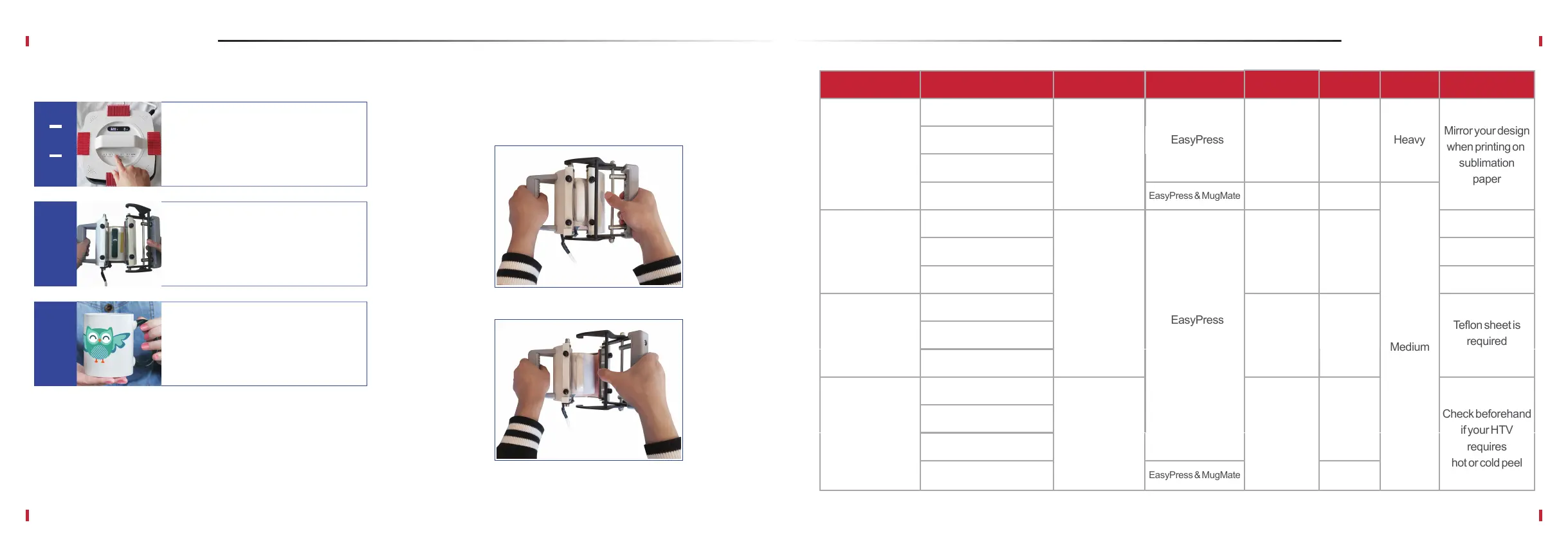
Place your thumb on the auxiliary lever.
Remarks
Transfer Material
Sublimation paper
Light color inkjet
& laser transfer
paper
Pull to open
How to Easily Open MugMate
200 °C
185 °C
165 °C
180 ~190 °C
25 ~ 35 s
15 s
8~15 s
Press TIMING button again to stop
the timer when the countdown
ends and the press beeps.
Open the press and carefully
remove the mug exercising
caution.
Carefully peel the transfer paper
from the mug. Voilà, your work is
done!
Light color polyester fabric
Time
Base Material
Non woven fabric bags
Light color cotton fabric
Coffee mugs
Light color polyester fabric
Non woven fabric bags
Light color cotton fabric
Dark color inkjet
& laser transfer
paper
Dark color polyester fabric
PU leather
Dark color cotton fabric
Polyester fabric
Knit fabrics
Cotton fabric
Printer Temperature TimeDevice Pressure Remarks
Heat transfer
vynil (HTV)
Coffee mugs
Micro
piezoelectric
inkjet Epson &
Ricoh printers
with CISS
& sublimation ink
Inkjet printer with
pigment ink &
inkjet paper.
Laser printer with
laser paper.
Cutting plotters
like Silhouette
Cameo 3
100~120 s
15~25 s
150~160°C
10~15 s
Check beforehand
if your HTV
requires
hot or cold peel
Mirror your design
when printing on
sublimation
paper


 To Next Page