SWITCHREPLACEMENT
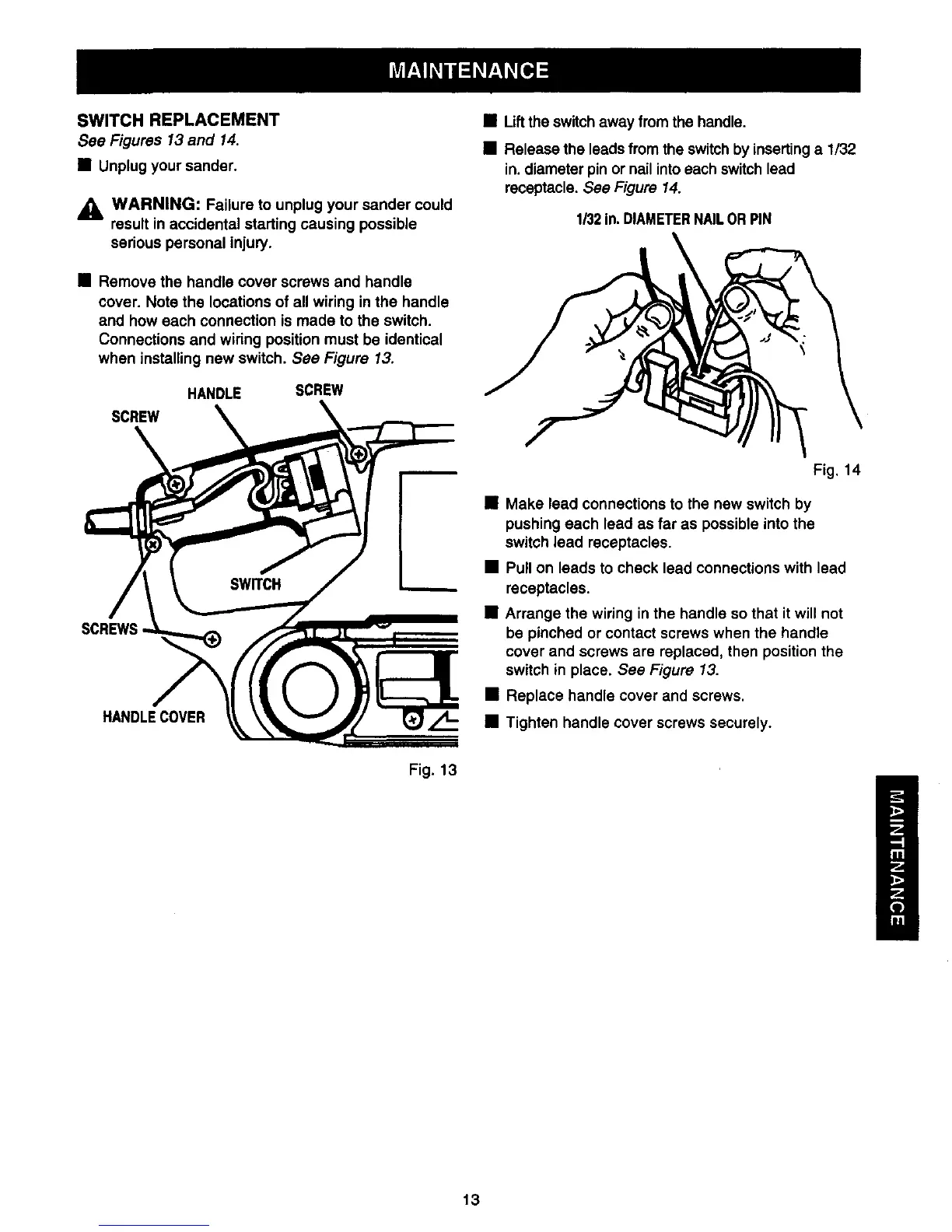
See Figures 13 and 14.
• Unplug your sander,
_k WARNING: Failure to unplug your sander could
result in accidental starting causing possible
serious personal injury.
• Remove the handle cover screws and handle
cover. Note the locations of all wiring in the handle
and how each connection is made to the switch.
Connections and wiring position must be identical
when installing new switch. See Figure 13,
HANDLE SCREW
SCREW
• Liftthe switch away from the handle.
• Release the leads from the switch by insertinga 1/32
in. diameter pin or nail into each switch lead
receptacle. See Figure 14.
1/32In.DIAMETERNAILOR PIN
SCREWS
HANDLECOVER
Fig. 14
• Make lead connections to the new switch by
pushing each lead as far as possible into the
switch lead receptacles.
• Pull on leads to check lead connections with lead
receptacles.
• Arrange the wiring in the handle so that it will not
be pinched or contact screws when the handle
cover and screws are replaced, then position the
switch in place. See Figure 13.
• Replace handle cover and screws.
• Tighten handle cover screws securely.
Fig. 13
13





 To Next Page