
 Need help?
Do you have a question about the Craftsman 82369 and is the answer not in the manual?
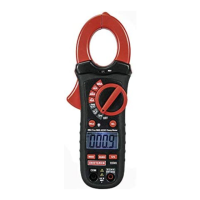
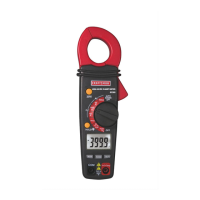
Identifies and describes the physical controls and connection jacks on the meter.
Details the ranges and accuracy for DC current measurements.
Details the ranges and accuracy for AC current measurements.
Details the ranges and accuracy for DC voltage measurements.
Details the ranges and accuracy for AC voltage measurements.
Details the ranges and accuracy for resistance measurements.
Details the ranges and accuracy for capacitance measurements.
Details the ranges and accuracy for frequency measurements.
Details the ranges and accuracy for duty cycle measurements.
Details the ranges and accuracy for temperature measurements.
Lists safety certifications and standards the meter complies with.
Step-by-step guide for measuring DC and AC current using the clamp meter.
Step-by-step guide for measuring DC and AC voltage using the clamp meter.
Procedure for measuring resistance, including safety precautions.
Steps to diagnose and resolve issues if the meter does not operate properly.
This document is the owner's manual for the CRAFTSMAN AC/DC Clamp Meter, Model No. 82369. It provides comprehensive instructions for the safe and effective use, operation, and maintenance of the device.
The CRAFTSMAN AC/DC Clamp Meter is a versatile electrical testing instrument designed to measure various electrical parameters in both AC and DC circuits. Its primary function is to measure current using a clamp, which allows for non-contact measurement of current flowing through a conductor, enhancing safety and convenience. Beyond current, the meter is capable of measuring AC and DC voltage, resistance, continuity, diode characteristics, capacitance, frequency, duty cycle, and temperature. This broad range of functions makes it a valuable tool for electricians, technicians, and DIY enthusiasts for troubleshooting and maintenance of electrical systems.
The device features a rotary function switch to select the desired measurement mode, an LCD display for clear readings, and several buttons for specific functions such as ZEROing, data hold, backlight control, mode selection, and range adjustment. The meter is designed for indoor use and is protected by double insulation, meeting safety standards for Category III 600V applications.
The clamp meter offers several features to facilitate ease of use and accurate measurements:
Current Measurement (AC/DC): The core feature involves using the current clamp to measure AC or DC current. Users simply press the trigger to open the jaw and enclose a single conductor. For DC current measurements, a ZERO button is available to null the meter display before taking a reading, which helps in achieving more accurate results by compensating for any residual magnetic fields. The manual emphasizes enclosing only one conductor within the clamp for accurate readings.
Voltage Measurement (AC/DC): To measure AC or DC voltage, test leads are connected to the COM and V/Ω/Temp jacks. The rotary switch is set to the Volts/Hz/% position, and the MODE button is used to select between AC and DC voltage. The manual includes a critical warning about the potential for misleading zero readings in some 240VAC outlets due to recessed contacts, advising users to ensure proper contact with the metal parts.
Resistance Measurement: For resistance measurements, the function switch is set to the Ω •))) CAP position, and test leads are connected. It is recommended to disconnect all power, remove batteries, unplug line cords, and discharge capacitors from the unit under test to avoid electric shock and ensure accurate readings. Disconnecting one side of the component under test is also advised to prevent interference from other circuit parts.
Continuity Check: This function, accessed via the Ω •))) CAP position and selecting the audible continuity mode, allows users to check for open or closed circuits. An audible signal sounds if the resistance is below approximately 150Ω, indicating continuity. An "OL" display signifies an open circuit.
Diode Testing: The meter can test diodes by setting the function switch to the Ω •))) CAP position and selecting the diode mode. Test probes are touched to the diode, and the forward voltage drop (typically 0.4V to 0.7V for normal diodes) or "OL" for reverse voltage is displayed. This helps identify shorted or open diodes.
Capacitance Measurement: To measure capacitance, the function switch is set to the Ω •))) CAP position, and the nF mode is selected. Test leads are connected, and the ZERO key can be used to null the display. Capacitors under test must be discharged before measurement to prevent electric shock.
Frequency and Duty Cycle Measurement: These functions are accessed by setting the rotary switch to the Volts Hz % position and using the HZ/% button to select the desired measurement. Test probes are connected to the circuit under test.
Temperature Measurement: The meter supports temperature measurement using a Type K thermocouple. The rotary switch is set to the Temp position, and the thermocouple is inserted into the COM and V/Ω/Temp jacks, observing correct polarity. The MODE button allows selection between Celsius (°C) and Fahrenheit (°F).
Auto Power Off: To conserve battery life, the meter automatically enters sleep mode after 30 minutes of continuous use. It can be reactivated by turning the function switch to OFF and then to the desired function.
Auto/Manual Ranging: The meter defaults to Autoranging mode, which automatically selects the appropriate measurement range. Users can switch to manual ranging by pressing the RANGE button, allowing for specific range selection. Pressing and holding the RANGE button for two seconds returns the meter to Autoranging mode.
Data Hold: The HOLD button freezes the current reading on the LCD, indicated by the "HOLD" icon. Pressing it again releases the hold.
Backlight: The backlight can be turned on or off by pressing and holding the HOLD button for more than two seconds, improving visibility in low-light conditions.
ZERO Function: This button is crucial for DC Current and Capacitance measurements, allowing users to null the display to eliminate residual readings. It also enables relative measurements by storing a reference value and displaying the difference between subsequent measurements and that reference.
The manual provides clear guidelines for maintaining the CRAFTSMAN AC/DC Clamp Meter to ensure its longevity and reliable performance:
General Care: Users are advised to keep the meter dry, avoid extreme temperatures, and handle it gently to prevent damage to electronic parts and the casing. The case can be cleaned with a damp cloth, but chemicals, cleaning solvents, or detergents should not be used.
Battery Replacement: The meter uses two 1.5V AAA batteries. A low battery indicator appears on the LCD when the batteries need replacement. The process involves disconnecting test leads, removing the rear screws to open the battery door, inserting new batteries, and securely fastening the battery door. The manual stresses the importance of proper battery disposal.
Safety Precaution for Maintenance: A critical warning is issued against operating the meter unless all covers are in place and securely fastened, especially after battery replacement, to prevent electric shock.
Troubleshooting: A dedicated section addresses common issues, such as the meter not operating. It suggests reviewing instructions, checking battery installation and condition, and verifying fuse installation. For further assistance, a customer service line is provided.
Service and Parts: The manual lists item numbers and descriptions for replacement parts, including test leads, temperature probe, replacement battery door, and rear cover screws, along with contact information for ordering.
Overall, the CRAFTSMAN AC/DC Clamp Meter is presented as a robust and feature-rich tool, with the manual emphasizing safety, proper usage, and simple maintenance procedures to ensure optimal performance and user protection.
 General
| Model | 82369 |
|---|---|
| Category | Measuring Instruments |
| Type | Digital Multimeter |
| Continuity Test | Yes |
| Diode Test | Yes |
| Power Source | 9V battery |
| AC Voltage Range | 200V |
| DC Current Range | 200µA to 10A |
| Measurement Range | Varies by function |
| Units of Measure | V, A, Ω |



 To Next Page