5
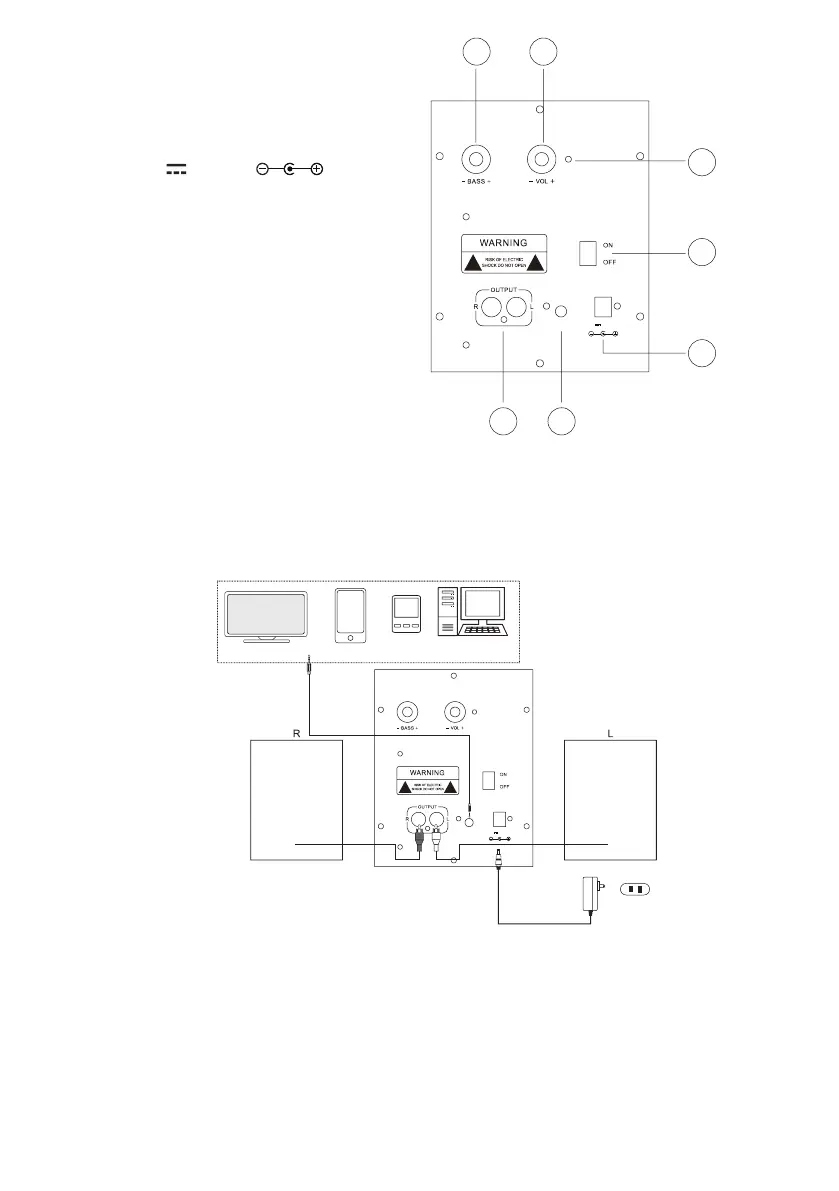
Location of Controls:
1. BASS Control Knob
2. VOL (Volume) Control Knob
3. Indictors
4. Power ON/OFF Switch
5. DC IN Jack (DC 12V, 1A, )
6. AUX IN Jacks
7. Speaker Output Jacks
Power Source:
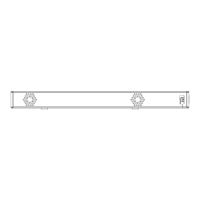
1. Insert the small plug from the supplied AC/DC Adaptor to the DC IN Jack on the unit.
2. Insert the AC/DC adaptor to a wall outlet having AC 100-240V~50/60Hz as the gure below:
NOTE: This AC/DC Adaptor is intended to be correctly orientated in a vertical or oor mount position.
Connections:
Connect the supplied speaker boxes to the main unit as the gure above.
OPERATION
BT (Blue Tooth):
In rst time use or re-pairing to a new BT Device, pairing the unit to external BT Device as below:
1. Press the Power ON/OFF Switch to ON position. Blue Indicator will light and blinking.
2. Power on the external BT Device and enter to searching mode. Start pairing as the on screen instructions
on the external BT Device. After paired, the Blue Indicator will stop blinking. (For details pairing procedures,
please refer to the user’s manual of your BT Device).
AUX IN DC 12V,1A
1 2
4
3
5
67
AUX IN DC 12V,1A
AC/DC Adaptor
AC Outlet
AC 110V-240V/50Hz
TV Cell Phone MP3/MP4P C



 To Next Page