13
AU X IN 1
AU X IN 2
L
R
OPTICAL IN
DC I N
DC 9 V, 1.5 A
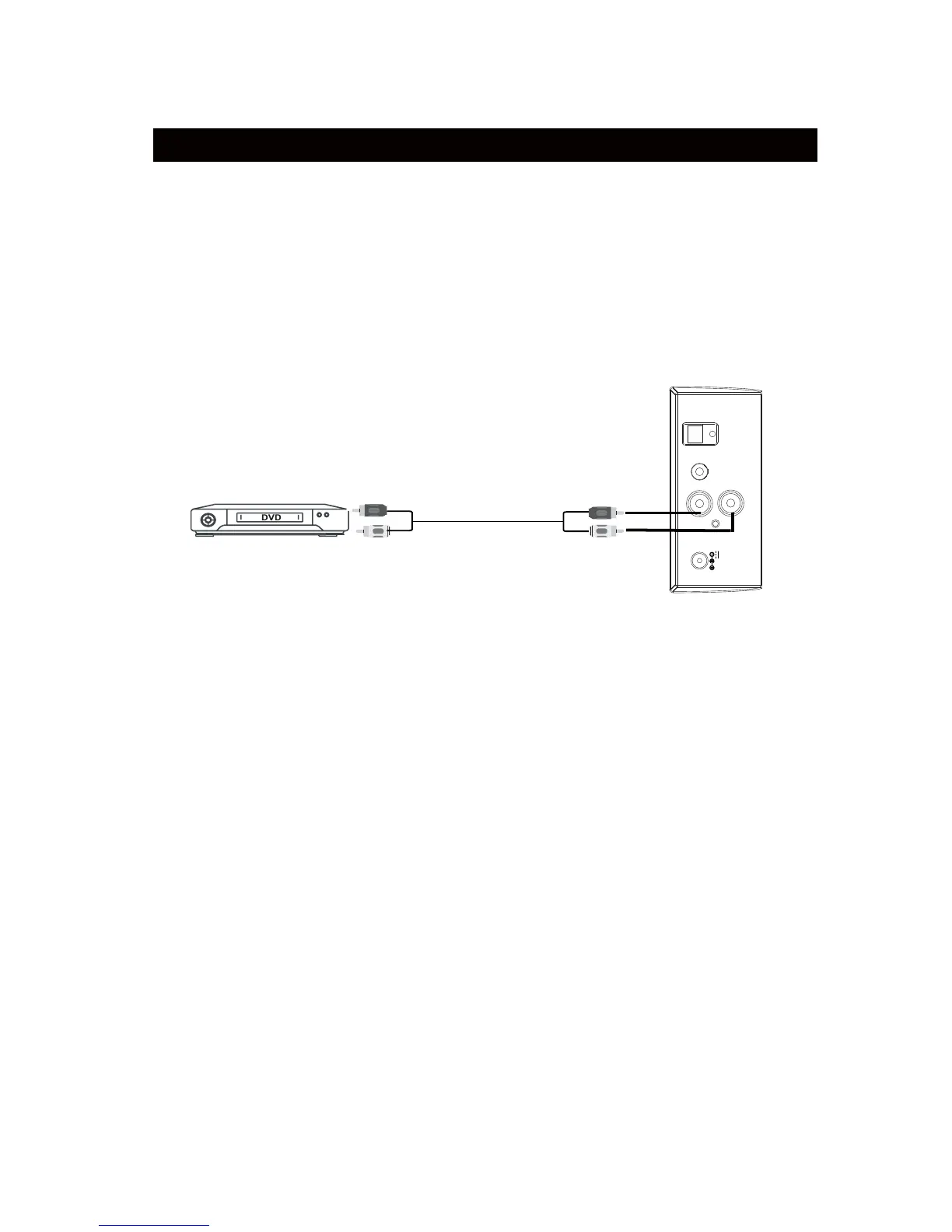
An external Video/Audio player (such as TV, DVD player, VCR, etc.) can be
connected to this
unit and heard through the speakers.
1. Plug one side of RCA White and Red cable (included) into the AU; IN 2 jacks
on the top
of unit.
2. Plug the other side of cable into Audio Out R L jacks of the TV or external
device as the
illustration below.
NOTE: Make sure to connect to AUDIO OUT. If you connect it into AUDIO IN of
external device,
you will not hear the sound.
3. Power ON the unit as previously explained.
4. Press the POWER/SOURCE button on the unit or press the SOURCE button
on the Remote Control repeatedly until the color of Indicator turns to Orange.
5. Power ON the connected external player and start playback as usual.
AUX IN 2 : LISTEN TO TV/DVD/VCR/DVR
To Audio Out Jacks
Red
White



 To Next Page