12
Line out jacks of TV
L R
Video
red
white
AUX IN 1:
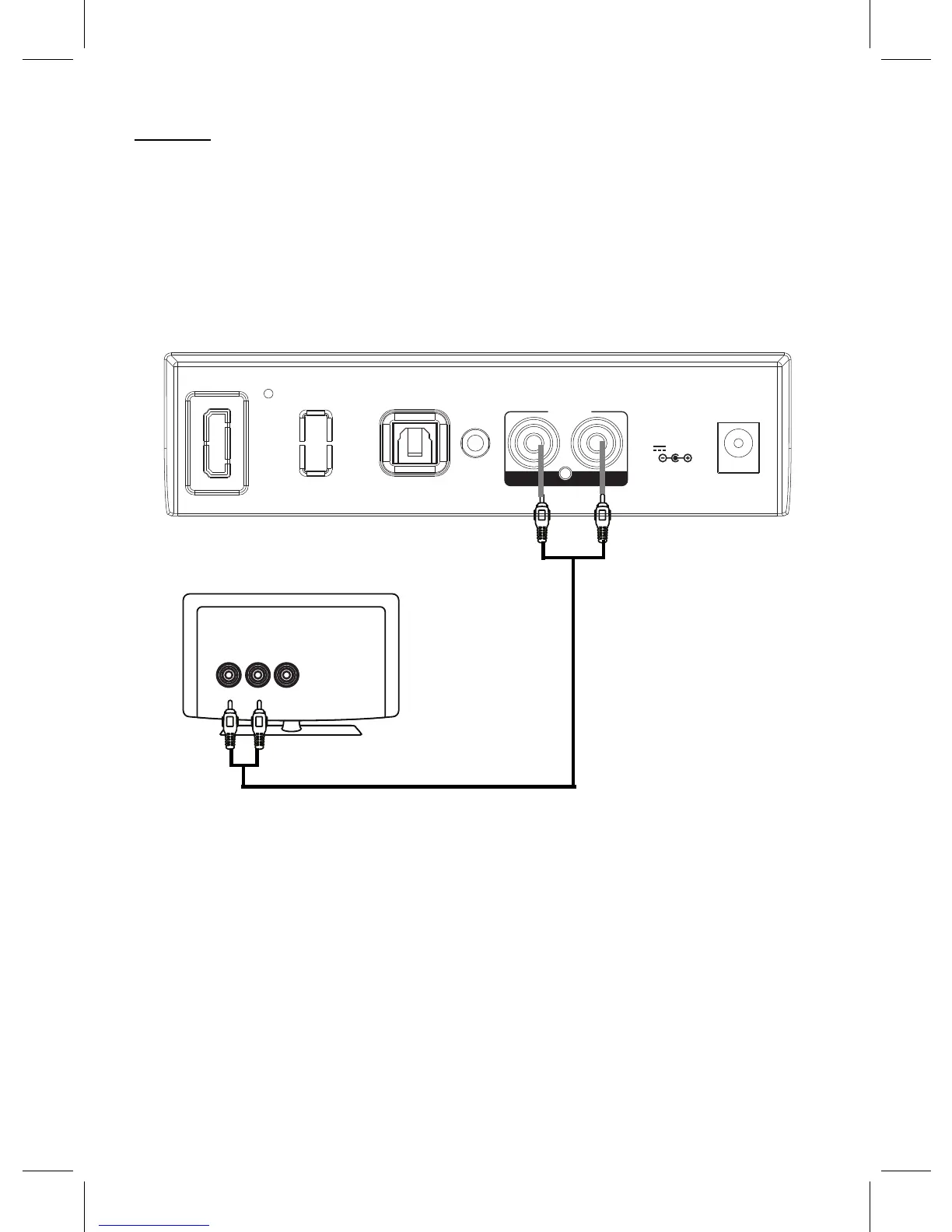
Listen music from RCA output jacks from an external Video/Audio Player such as a Television;
2. Connect the other end of the cable to the AUX IN 1 Jacks on the rear of unit as illustrated
below:
1. Connect one end of the RCA Connection Cable (not included) to the AUX Out Jacks on the
external Video/Audio Player.
3. Power on the unit and enter to AUX IN 1 mode as previously instructed. The color of the
indicator on the front of unit will turn to Colorful (Red + Blue + Green Mixed).
4. Play the video/music on the connected Video/Audio Player as usual. (Make sure the volume
level of the connected Video/Audio Player is turned to high level.)
OPTICAL IN
AU N
AU N 1
L R
DC IN
DC 5.8V,1.5A
X I
X 2 I
DVD Player, VCR … etc.



 To Next Page