CRAMERTOOLS.COM
24
EN
Troubleshooting
Indicator LEDs on Charging Station
LED Status MeAning Action
Green
On Boundary wire and Charging station OK No action required.
Blue Flashing Boundary wire broken or not connected Check and repair boundary wire.
Red Flashing Electronic fault in charging station or power supply Unit Please contact your dealer.
This section also presents some symptoms that can guide you if the mower does not work as expected.
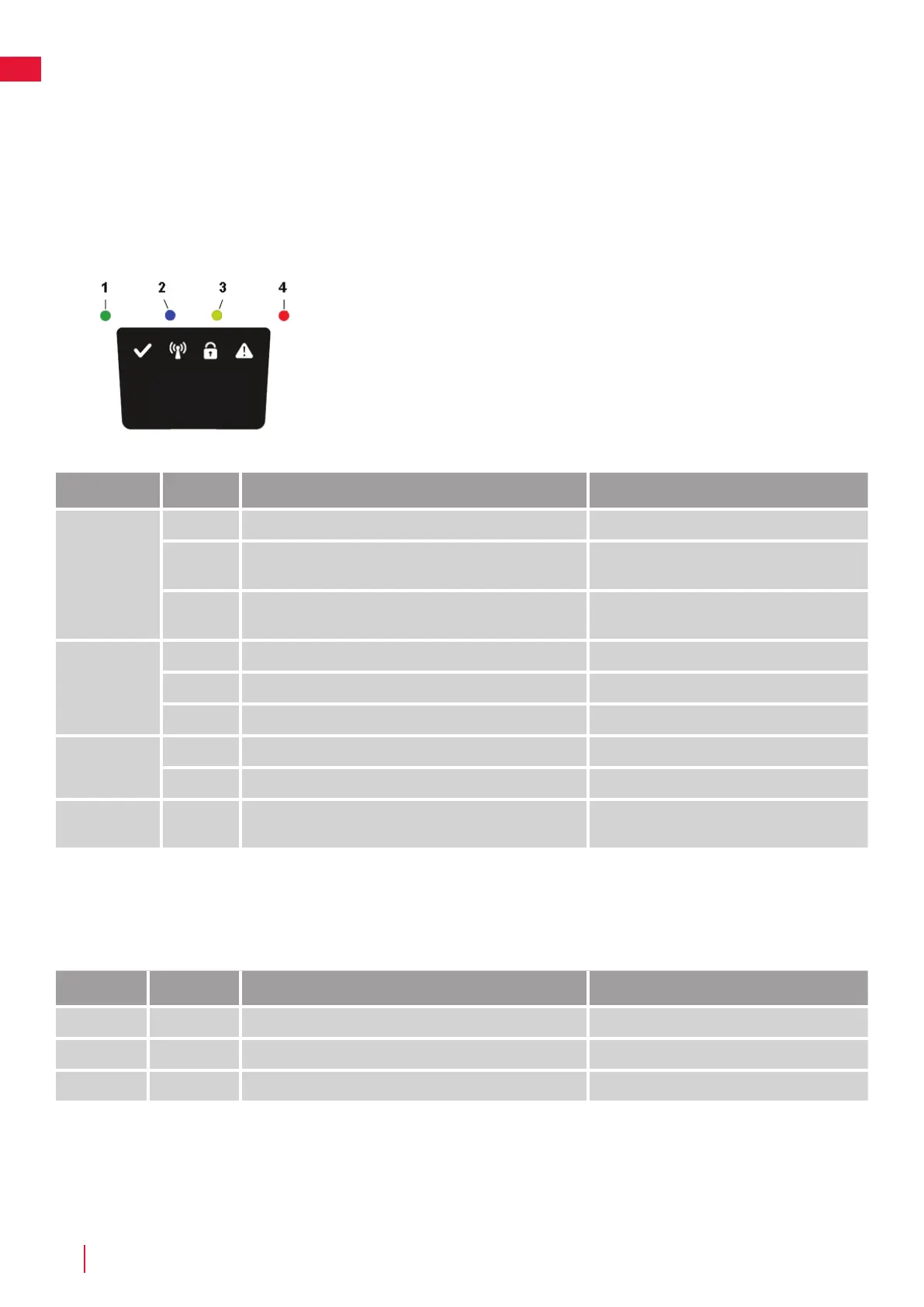
Indicator LEDs on Mower
LED Status MeAning Action
1. Operating
(Green)
Flashing Mower stopped with Stop button on mower Press Start on mower for operation
On Mower in operation mode (charging, parked in Charging
station, paused, mowing or searching)
O Safety key in in the Disabled position, mower in Error state
or mower waiting for PIN code.
2. Connectivity
(Blue)
Flashing Trying to connect to internet server
On Connected to internet server
O Mower not in ”Power on mode”
3. Security
(Yellow)
Flashing PIN code authorization required ... via Mobile App.
O No pin required No action required
4. Error
(Red)
Flashing Mower stopped with error Check the reason for the error and then restart
by pressing the Start button on the mower.


 To Next Page
 Loading...