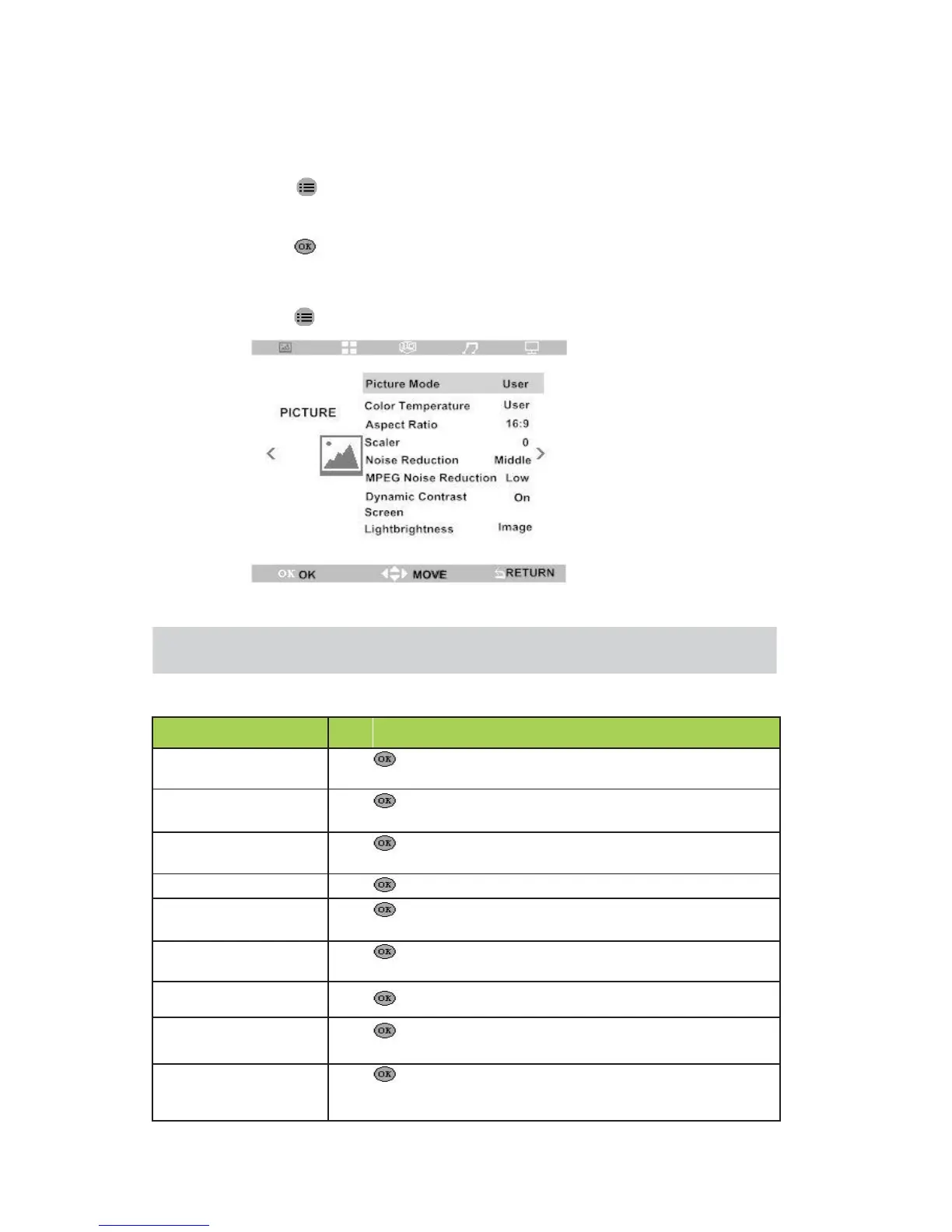
Picture Menu
Visit picture menu and adjust setting ,do it as following:
1. Press enter into OSD menu then press ◄ and ► to go to “PICTURE" menu.
2. Press ▲and ▼ move to the menu to be adjusted.
3. Press to adjust option setting,or enter into then press◄ and ►or ▲and
▼setting parameter.
4. Press to save setting and go back to last menu.
Note :Only menu “picture mode/color temperature” in User mode, inner parameter can
be adjusted (Brightness,Contrast,Color)
then press◄ and ► to set picture display mode
(contrast ,brightness, sharpness)
then press◄ and ► adjust color temperature value of
picture (red, green, blue)
Adjust width and height ratio of picture
to set level of noise reduction
set level of noise reduction
set dynamic contrast enhancement ( on/off )
then Press ◄ and ► adjust position of picture
then Press◄ and ► adjust picture brightness mode


 To Next Page