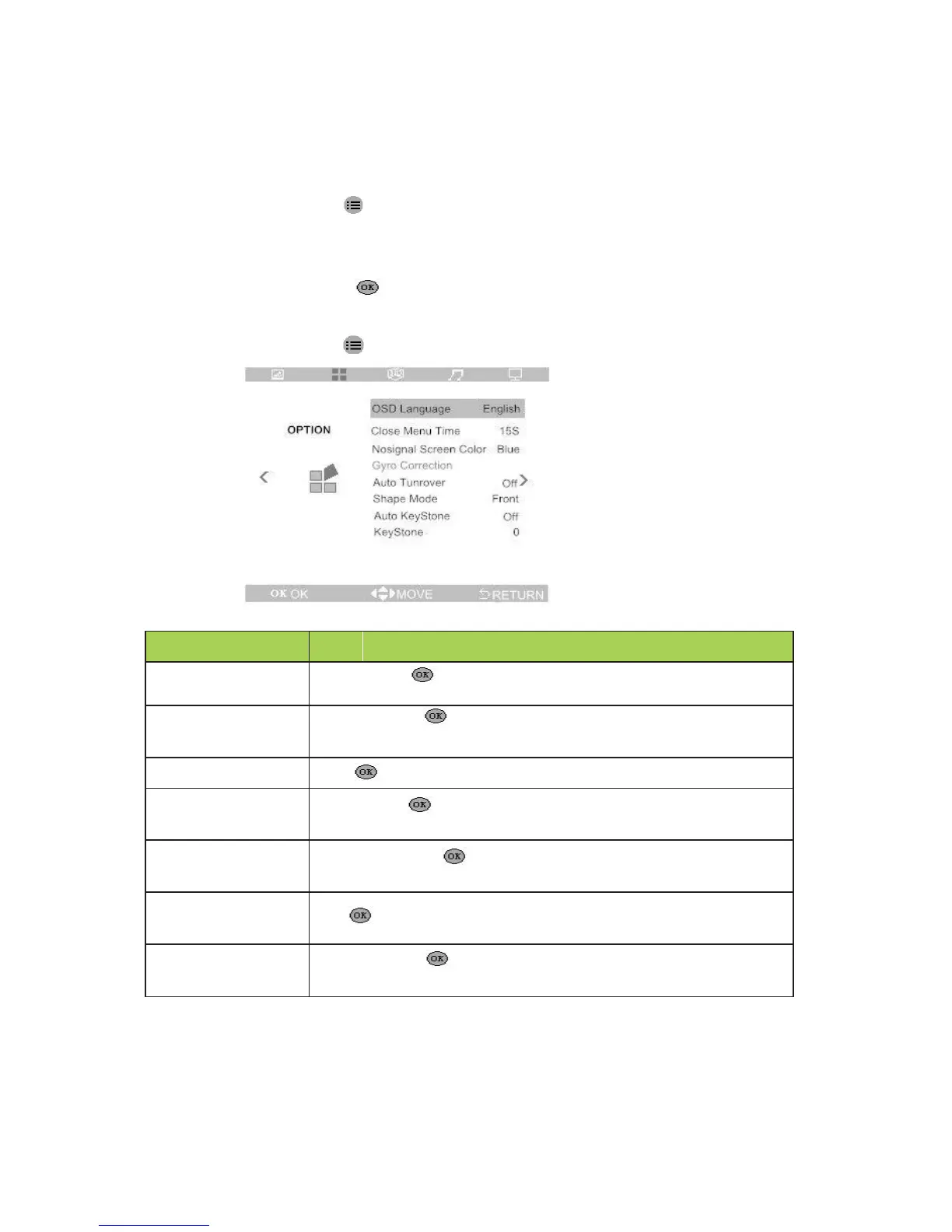
Option Settings
To access the options menu and adjust the settings, perform the following steps:
1. Press the key to enter the OSD menu, press buttons ◄ and ► to
select the “OPTION” menu.
2. Press button ▲and ▼ to move to the item needs to be adjusted.
3. Press the button to adjust the option settings, or after you enter the
menu, press buttons ◄ and ►or press button ▲and ▼ to set parameters.
4. Press the key to save settings and return to the previous menu.
to enter , then press buttons ◄ and ►to set the
to enter,then press buttons ◄ and ►to set the
time to close the menu if the usder do not operate the menu.
set auto turnover ( on/off )
to enter ,then press buttons ◄ and ►to set
the screen color when there is no signal.
to enter to set the image projection Mode
Front , rear , front ceiling, rear ceiling.
set auto keystone ( on/off )
to enter, then press button ◄ and ► to
manually correct the trapezoid image.


 To Next Page