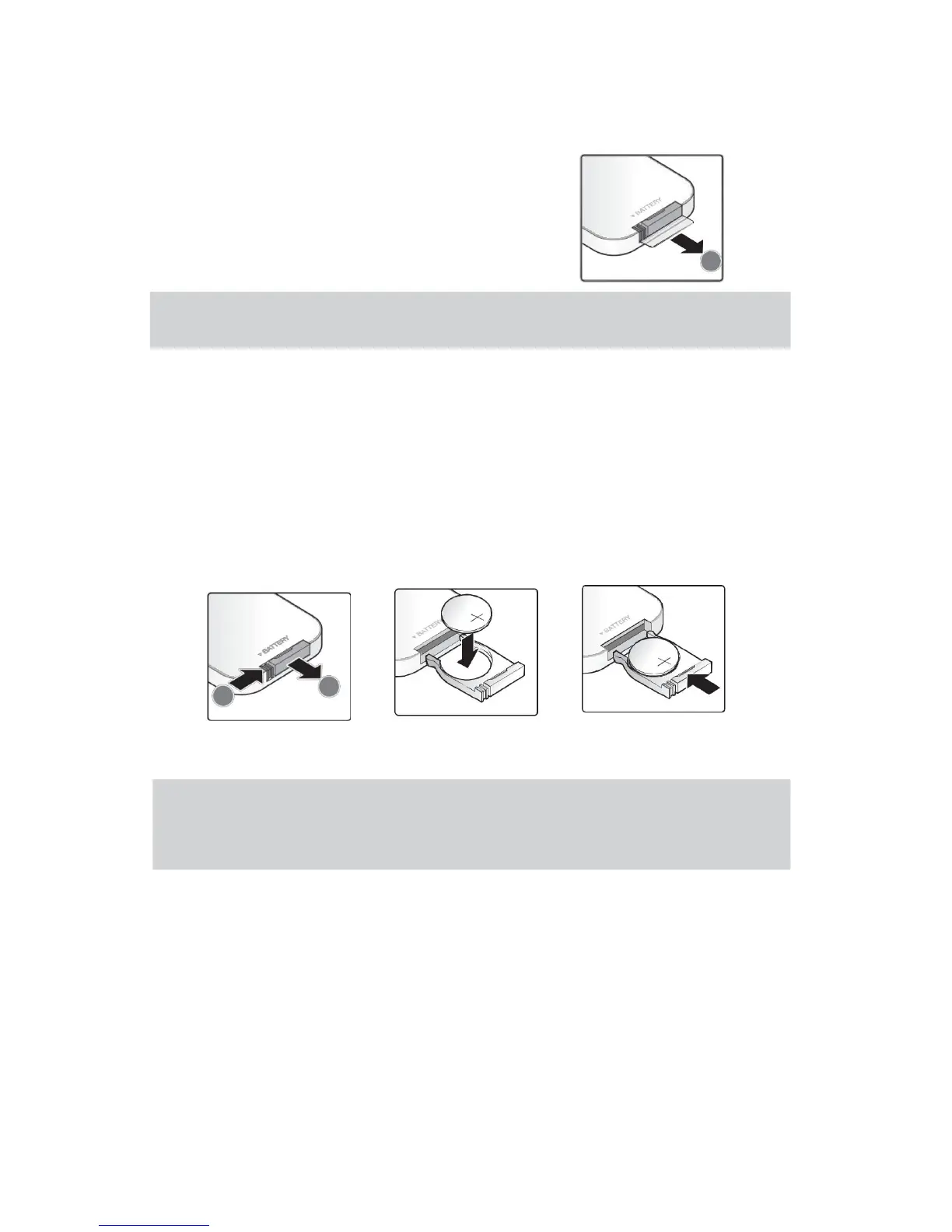
Set the Remote Control
The remote control is equipped with a 3V lithium battery
(CR2025). Battery was pre-installed in the remote control.
Before use the remote control, take out the plastic
sheet from the battery warehouse .
Note: If the goods shipped by Express or by Air(Battery is not allowed with cargo on the
plane), the battery pre-installed will be taken out before shipping, so please buy the battery in
your local store.
Change Remote Control
Battery
1.Toward the direction of
arrow(A) ,move and open
the battery cover.Toward
the direction of arrow(B)
pull out of the cover.
2.
Remove the old
3.
Fit on battery’s
battery, install new cover.
battery(the positive
upward).
A
B
Note:
1. Can only use 3V lithium battery (CR2025)
2. In accordance with the relevant local regulations dispose the waste batteries.
3. Long time do not use the equipment ,should take out the battery.
Scope of Work
The remote control controls the projector through the infrared transmission . Remote
control in the radius of about 7 m (23 ft) and above or below projector’s range of 15
degrees ,it can work normally (but the remote control can not perpendicular to the bottom of
the projector ). If the projector does not response to the remote control instruction, please
move it near to the projector.
7


 To Next Page