10
ENGLISH
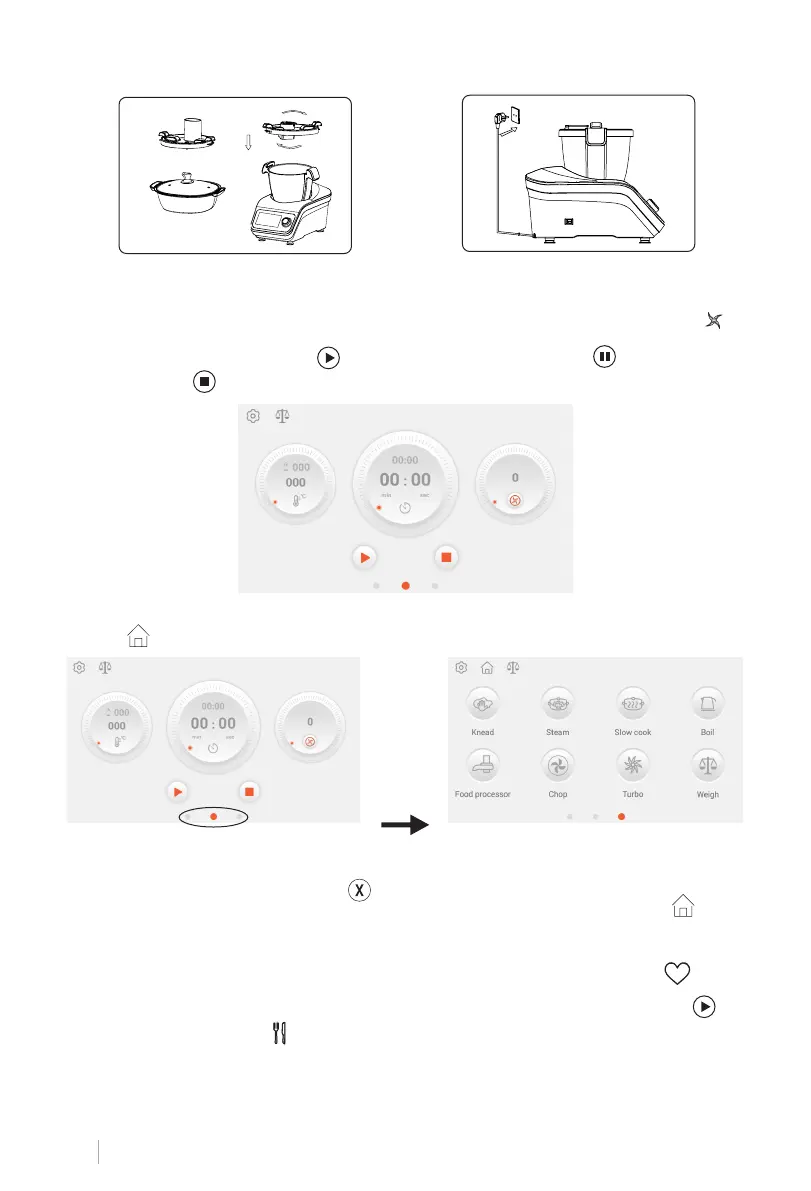
5. Attach the Blender lid, or FP lid or Steamer.
6. Plug your Powercord into the main base. Switch on.
7. Click pictos of temp/time/speed. Use your nger to slide or rotate the knob to set the
paramters. Click min or sec on time picto to set corresponding parameters. Click to
shift between clockwise and reverse.
8. After parameters are set, click or press knob to start work. Click or press knob to
pause or click or long press knob to stop.
9. Slide right or click the right dot in the red circle to enter into auto program interface.
Click or the middle dot in the red circle to home page/DIY interface.
10. Click pictos on auto programs interface to enter corresponding working interface. Set
parameters as per step 7~8. Click to exit.
11. Slide left or click left dot in the red circle to enter into recipe interface. Click or the
middle dot in the red circle to home page/DIY interface.
12. Click the recipe picture to enter specic recipe interface. Click Ingredient/Cooking
step/Chefs tips/accessories used for cooking guidance. Click to start. Click for fa-
vorite collections.
13. Each recipe has preset parameters. Adjust parameters as per step 7/8. Click to
start step by step. Click to check the related information of recipe.
5
6


 To Next Page