13
ENGLISH
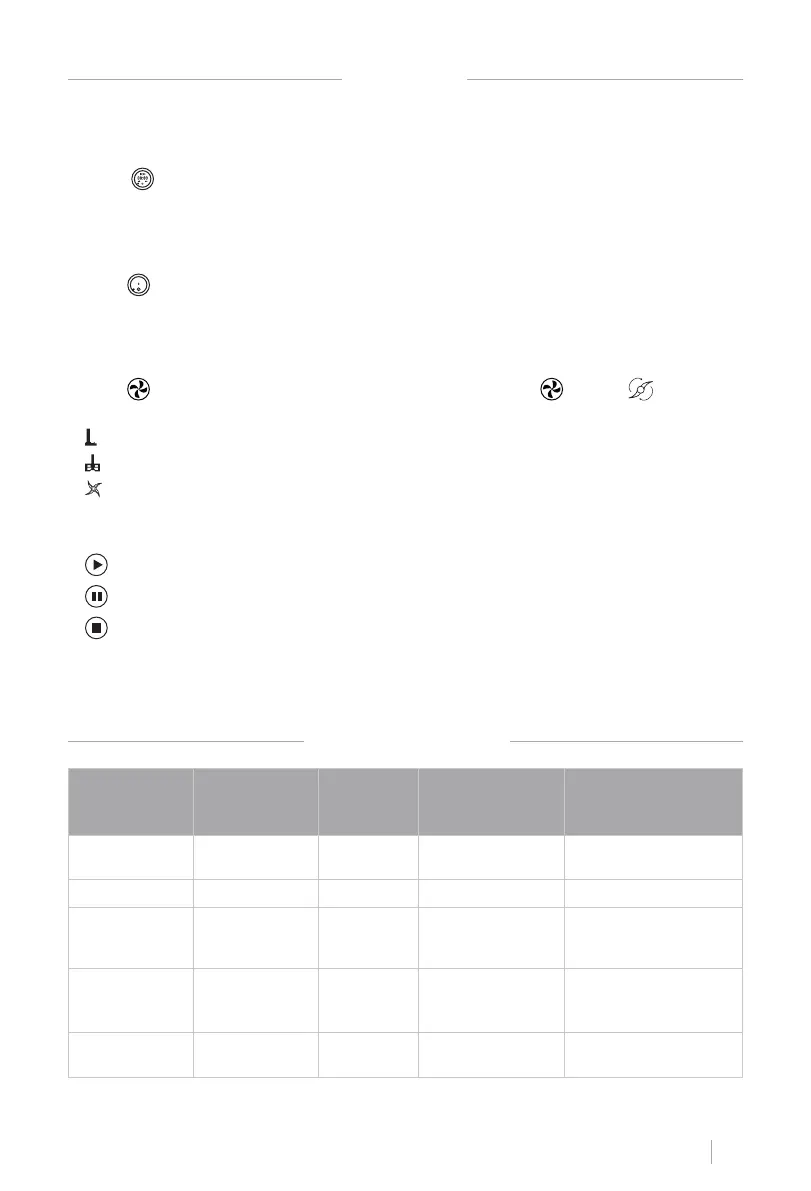
SETTINGS
1. Time range: 0-90 minutes.
2. Click , click min or sec, slide or rotate the knob to set time.
SETTING THE TIME
1. Temperature range: 37-120°C with 5° intervals.
2. Click slide the icon or rotate the knob to set the temperature.
SETTING THE TEMPERATURE
1. Speed range: 0-12.
2. Click , slide the icon or rotate the knob to set speed. Click , shift to with speed
setting 1-3.
• Speed 1-3
• Speed 1-4
• Speed 1-12
SETTING THE SPEED
• Start
• Pause
• Stop
During standby mode, white and red lights ash. Red light underneath knob is on when
temperature is beyond 60°C, and white light is on when temperature is below 60°C at any
working mode.
START, PAUSE AND STOP
SUGGESTED USAGE
FUNCTION ACCESSORY SPEED TIME
MAXIMUM COOKING
INGREDIENTS IN
ONE TIME
Meat Chopping Chopping blade Speed 8 - 12 30 - 60 seg
600g Beef/pork without
bone/tendon
Ice Crush Chopping Blade Speed 8 - 12 10 - 20 seg 600g Ice cube
Blender Chopping Blade Speed 12 1 min
Maximum Capacity:
2300ml
800g carrot 1200g water.
Chopping
(Onion,Shallot,
Celery.etc)
Chopping Blade Speed 5 15 - 30 seg 500g. 1 onion.
Kneading Chopping Blade Speed 1 2 min
500g our + 250g water
+ 20g oil


 To Next Page