10
ENGLISH
• Choose the suspension bar that best suits your situation.
• Remove the bolt from the bar by removing the pin and thread the canopy (roof trim) and
motor canopy through the hanger bar. Next, route the fan motor wires through the inside of
the hanger bar. Fit the hanger bar to the engine and insert the bolt and cotter pin.
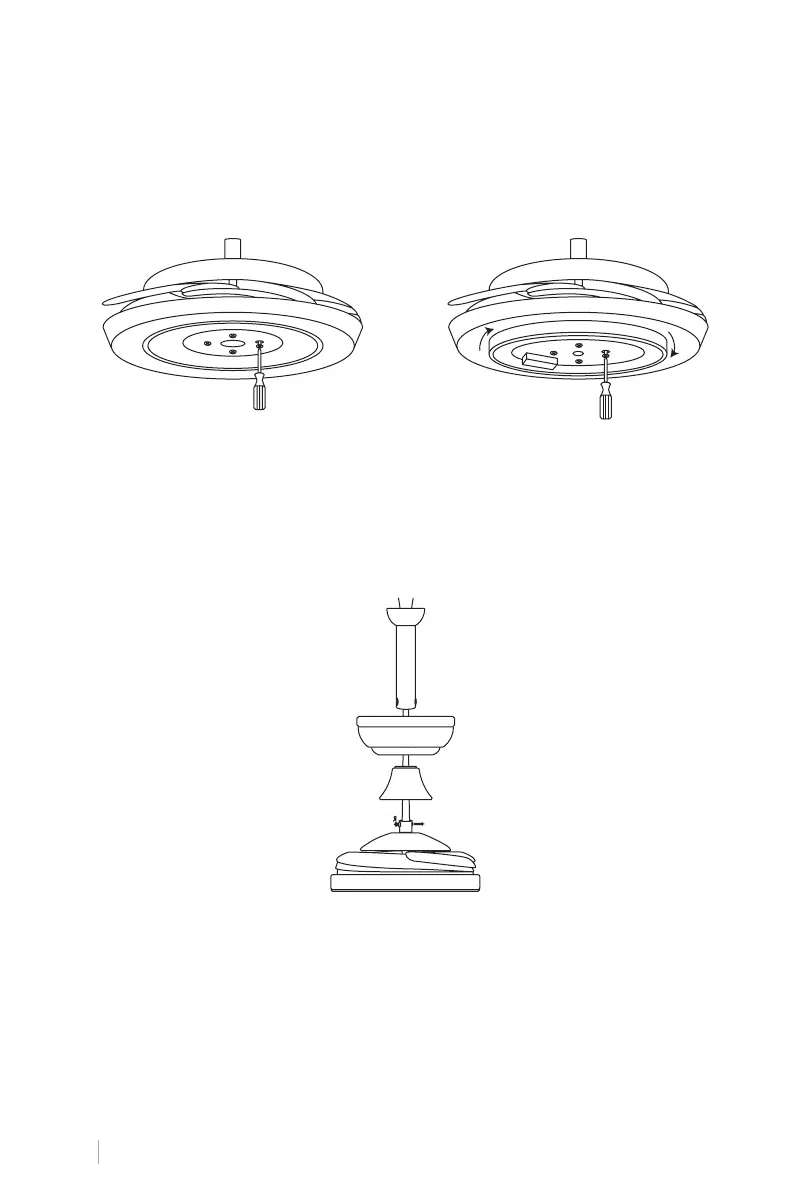
1. Loosen the four screws on the bottom of
the fan body and remove one side of the
computer for later use.
1. Take out the pin from the bottom of the fan body by removing the cliq R.
2. Thread the cable through the bar, canopy, and trim, then seat the bar into the fan body and
rotate until the holes in the bar align with the holes in the fan body.
3. Finally insert the pin through the holes and x it with the cliq R on the other side.
CHOICE OF FAN HEIGHT
INSTALLATION OF THE LIGHT PLATE
SUSPENSION SYSTEM INSTALLATION
2. Attach the light kit to the fan body by
rotating the light kit until it seats on the
three loosened screws on the fan body,
then tighten the screws, also screw in
the extractor screw and tighten.


 To Next Page