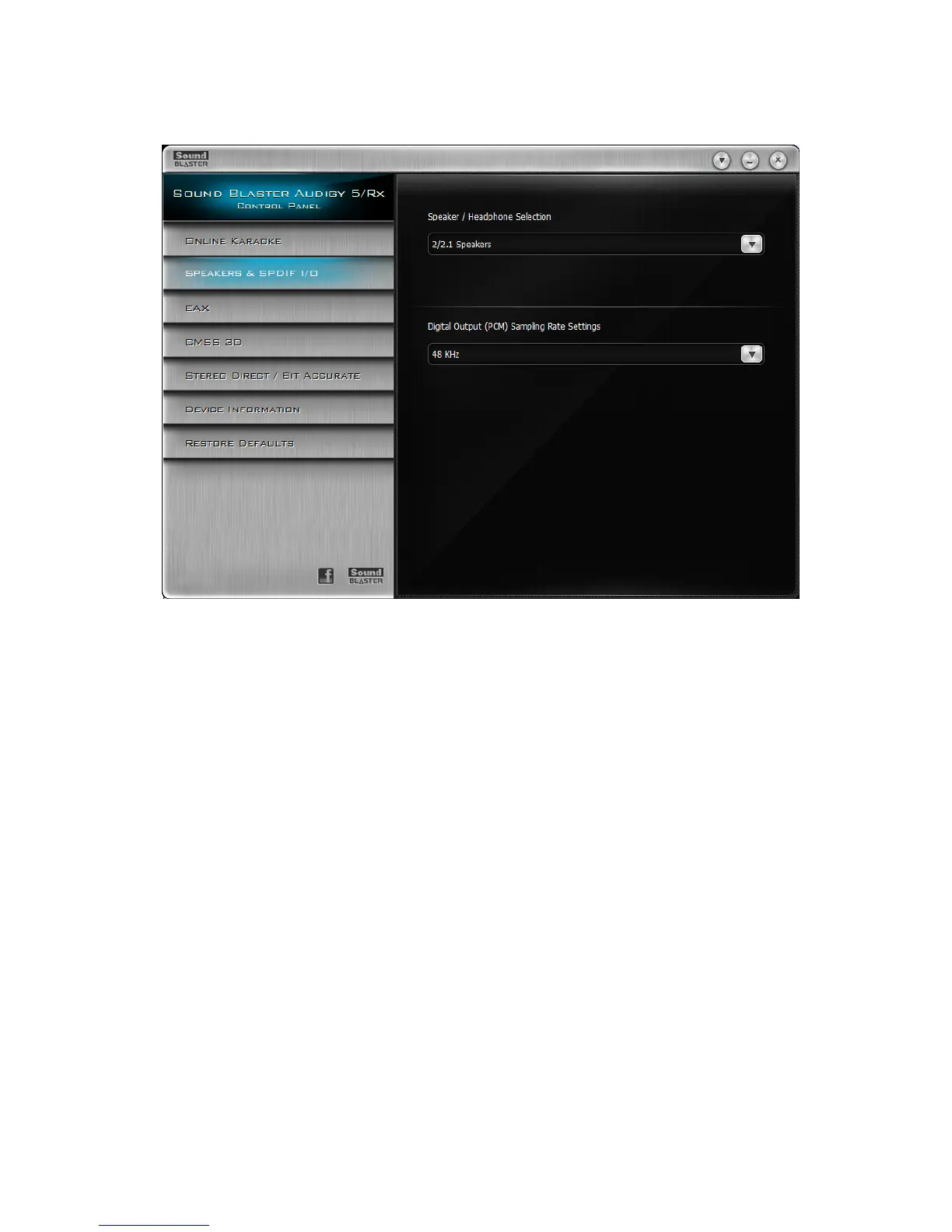
Speakers & SPDIF I/O Settings
Selecting a speaker configuration
1. Click the Speakers & SPDIF I/O tab.
2. On the Speaker / Headphone Selection dropdown list, select a speaker configuration that you
want.
3. Only for Windows XP users: To ensure that your speaker settings are always synchronized with
Sound Blaster Audigy 5/Rx Control Panel and Windows Control Panel, click the Synchronize with
Microsoft Windows Control Panel checkbox. Only enable this synchronizing feature if you reg-
ularly play games or install new applications, which can automatically readjust your speaker set-
tings in Windows Control Panel.
Selecting a Digital Output Sampling Rate
1. On Sound Blaster Audigy 5/Rx Control Panel, click the Speakers & SPDIF I/O tab.
2. Click the Digital Output (PCM) Sampling Rate Settings dropdown list and click the required
sampling rate.
The sampling rate of the PCM SPDIF output of your Digital Out connector must match the require-
ments of the receiving device.
Using Your Sound Blaster Audigy 5/Rx Control Panel 29









 To Next Page