4
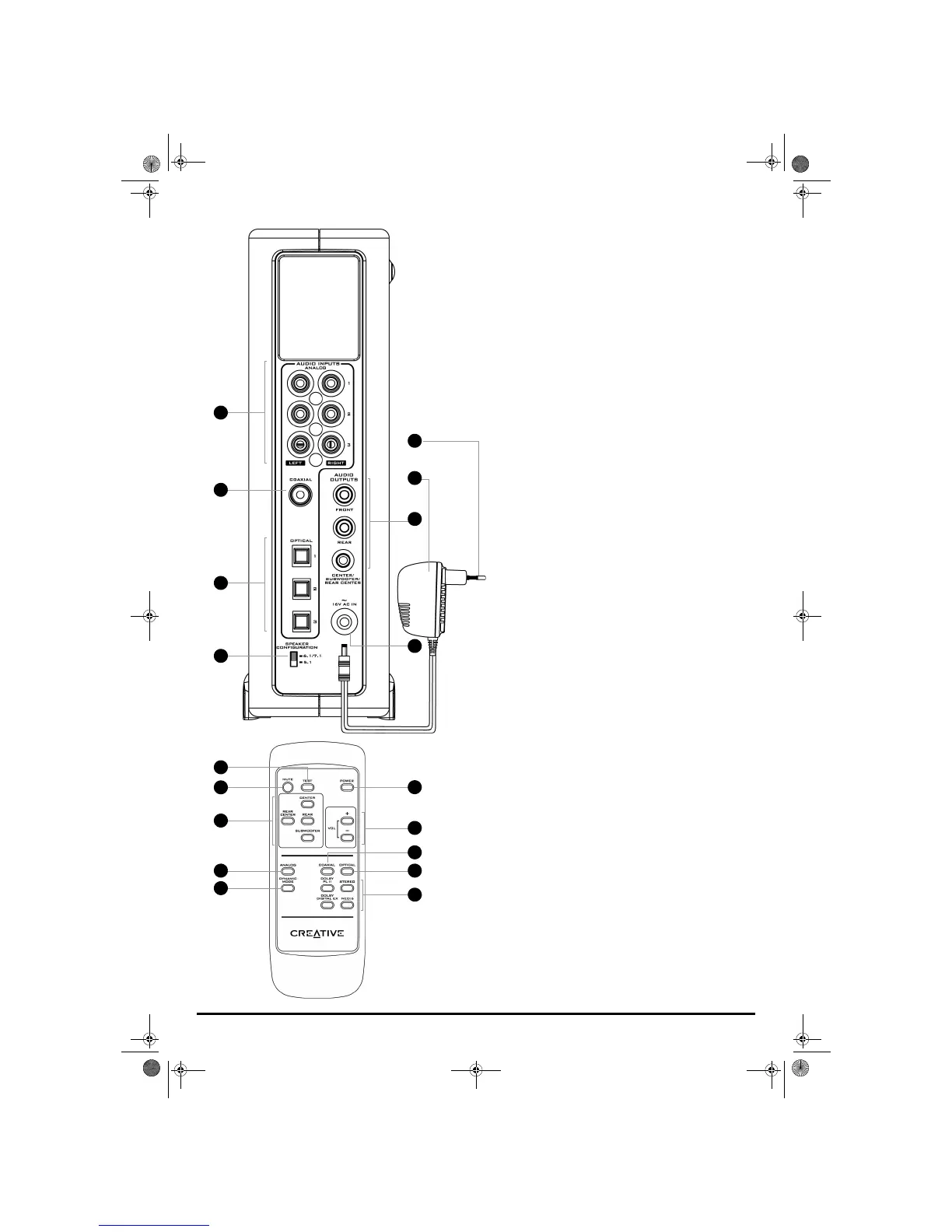
15 ANALOG inputs
Connect to a maximum of three stereo sources using cables with
RCA phono plugs (available separately) for input to the decoder. For
more information, see “Connecting and Selecting Input Devices” on
page 6.
16 COAXIAL input
Connects to a digital source using a Coaxial cable. For more
information, see “Connecting and Selecting Input Devices” on
page 6.
17 OPTICAL inputs
Connect to a maximum of three digital sources using Optical cables.
For more information, see “Connecting and Selecting Input Devices”
on page 6.
18 SPEAKER CONFIGURATION switch
Select 6.1/7.1 when using a 6.1 or 7.1 speaker system, and select 5.1
when using a 5.1 speaker system. For more information, see
“Connecting Speakers” on page 5.
19 To Wall Outlet (Disconnect when not in use for several days)
20 Power Supply Adapter (Types of adapters may vary in different
countries)
21 AUDIO outputs
Connect to multichannel speakers (available separately). For
detailed information on speaker connections, refer to the User’s
Guide of your multichannel speakers.
22 16V AC IN connector
Connects to a wall outlet using the supplied Power Supply Adapter.
23 TEST button
Press to activate a test noise. For more information, see “Adjusting
Output Channels” on page 12.
24 MUTE button
Press to mute the volume.
25 Output Channel buttons
Press to select the Rear Center, Center, Rear or Subwoofer output
channels.
26 ANALOG button
Press to select and switch between the following analog inputs:
ANALOG 1, ANALOG 2, or ANALOG 3.
27 DYNAMIC MODE button
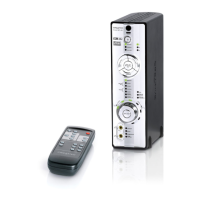
The Creative Decoder DDTS-100 is set, by default, to compressed
Dynamic Mode. To enable the full dynamic range to be heard at lower
volumes, you may uncompress the dynamic range to its full splendor
by pressing the DYNAMIC MODE button on the remote control. The
uncompressed mode can only be enabled with the remote control.
The decoder will acknowledge uncompressed Dynamic Mode by
illuminating all of the Vol ume LEDs momentarily. Pressing the
DYNAMIC MODE button again enables the compressed Dynamic
Mode; the first four Vol u me LEDs will light momentarily to
acknowledge that the compressed mode is enabled.
28 POWER button
Press to turn on the decoder, or set it to Standby.
29 VOL +/- buttons
Press to adjust the volume. For more information, see “Adjusting
Output Channels” on page 12.
30 COAXIAL button
Press to select the
COAXIAL input.
31 OPTICAL button
Press to select and switch between the following digital inputs:
OPTICAL 1, OPTICAL 2, or OPTICAL 3.
32 Mode buttons
Press to select the one of the following listening modes:
STEREO,
DOLBY PLII MOVIE, DOLBY PLII MUSIC, NEO:6 CINEMA, or NEO:6 MUSIC.
Press the DOLBY DIGITAL EX button to upmix 5.1-channel audio to
6.1-channel audio (for 6.1 speaker systems only).
Press the DOLBY PLII button to toggle between Movie and Music
modes.
Press the NEO:6 button to toggle between Cinema and Music
modes.
2
1
15
16
17
18
2
0
2
2
24
23
25
26
27
2
8
2
9
3
0
3
1
3
2
1
9
Gimo1.book Page 4 Thursday, October 9, 2003 11:18 AM


 To Next Page