8
PC Users (Audio Cards)
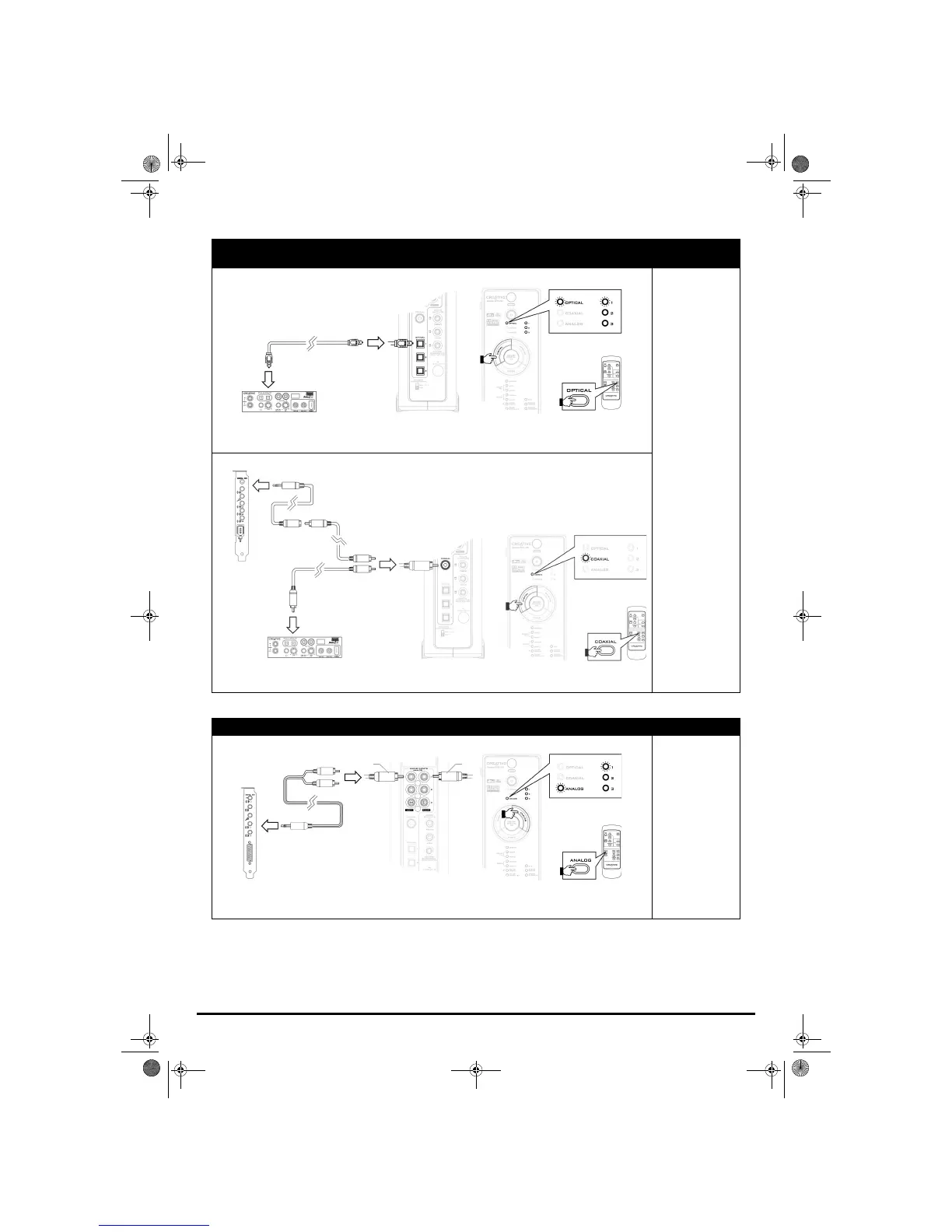
Audio cards with digital output connectors
(such as Creative Sound Blaster
®
Audigy
®
2 ZS, Audigy 2, Audigy and Live!
®
series audio cards)
Using an optical connection
Signal:
DTS, DTS-ES, Dolby
Digital, Dolby Digital
EX or Digital (PCM)
stereo
For best performance,
ensure that audio
output signals are not
decoded by your
audio card. For more
information, refer to
the User’s Guide of
your audio card.
Using a coaxial connection
Audio cards with analog output connectors
Signal:
Analog stereo
Press the DIGITAL button on your decoder,
or the OPTICAL button on your remote
control to select an OPTICAL input
(
OPTICAL 1, OPTICAL 2 or OPTICAL 3).
Optical cable
Press the DIGITAL button on your
decoder, or the COAXIAL button on your
remote control to select
COAXIAL.
Coaxial cable
Miniplug-to-RCA cable
(available separately)
Miniplug-to-dual-RCA cable
(available separately)
Press the ANALOG button on your
decoder, or the ANALOG button on your
remote control to select an ANALOG input
(
ANALOG 1, ANALOG 2 or ANALOG 3).
Red
White
Gimo1.book Page 8 Thursday, October 9, 2003 11:18 AM


 To Next Page