8
❒
Mount the rear satellites only on
walls that are structurally sound.
❒
Position the satellites behind you
and slightly above ear level.
1
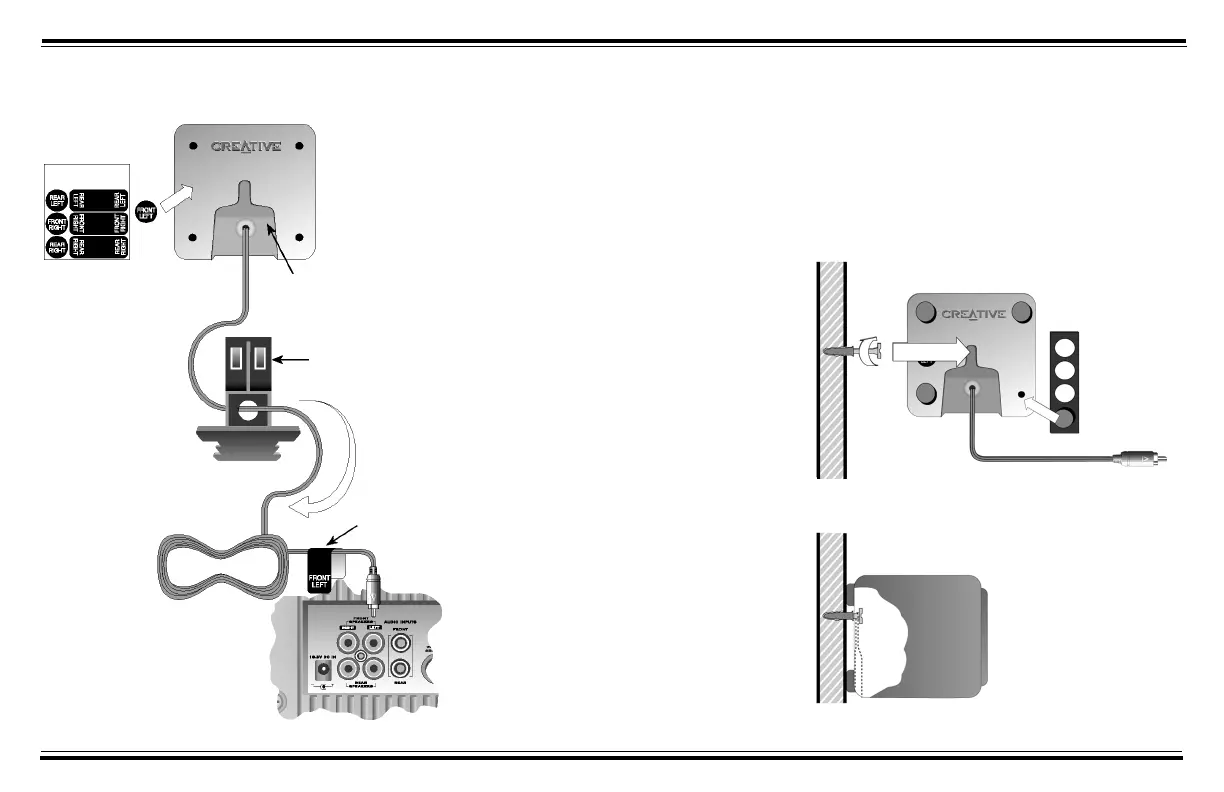
Drill a hole about 0.5
cm (¼ inch) deep
into wall.
2
Tap plastic anchor
into hole until it is
flush with wall.
3
Screw a M5 x 25 mm
screw into anchor,
leaving about 0.5 cm
(¼ inch) protruding.
4
Apply rubber pads on
the back of each rear
satellite.
5
Slip keyhole slot of
each rear satellite
onto protruding
screw.
Installing Desktop Stands Mounting Rear Satellites on Walls
2
Thread satellite cable
through hole in desktop
stand.
3
Insert attachment arm into
socket at back of satellite.
Attachment arm.
1
Apply identification
label to back of
satellite.
4
Apply Identification
label to cable.





 To Next Page