
 Need help?
Do you have a question about the Creative Outlier Air and is the answer not in the manual?
First ear bud removed is main unit. Main unit auto-switches to pairing mode (LED flashes Red & Blue).
Switch OFF Bluetooth on the previously paired device or remove it from the paired list.
On the main unit, press and hold the Multifunction button for 3 seconds to initiate pairing.
Once in pairing mode, attempt pairing on the new Bluetooth device and confirm connection.
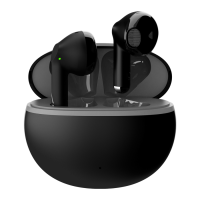
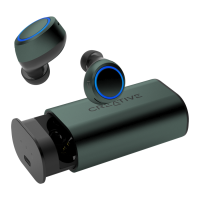
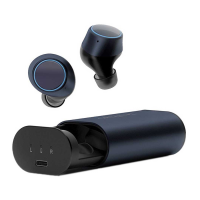
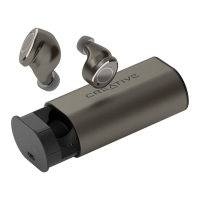
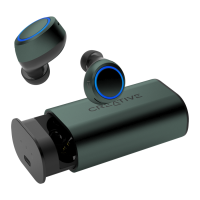
The Creative Outlier Air is a pair of true wireless earbuds designed for mobile device Bluetooth connectivity, offering a seamless audio experience with intuitive pairing and control features. The earbuds are engineered for ease of use, from initial setup to daily operation, and are designed to provide a stable connection for various activities.
The primary function of the Creative Outlier Air earbuds is to provide wireless audio playback and hands-free communication when paired with a Bluetooth-enabled mobile device. Each earbud contains a multifunction button that allows users to control various aspects of their audio experience and manage calls without needing to interact directly with their phone. The earbuds are designed to work in a main-secondary unit configuration, ensuring a stable and reliable connection. When removed from the charging case, the earbuds automatically enter a pairing mode, indicated by flashing LED lights, making the initial setup process straightforward.
The Creative Outlier Air supports both single and dual earbud use. When only one earbud is used, it functions as the main unit, providing full audio and call capabilities. If both earbuds are used, one acts as the main unit, handling the primary Bluetooth connection to the mobile device, while the other functions as the secondary unit, connecting to the main earbud. This architecture ensures that the audio signal is consistently delivered to both earbuds, providing a stereo listening experience. The system is designed to automatically manage these connections, simplifying the user experience.
Call management is an integral part of the Creative Outlier Air's functionality. Users can answer, end, reject, or switch calls between the earbuds and their phone using the multifunction button. This feature is particularly useful for those who need to stay connected while on the go, allowing for quick and convenient call handling without interrupting other activities. The earbuds are equipped with microphones to facilitate clear voice transmission during calls.
Voice assistant integration is another key feature, allowing users to activate their mobile device's voice assistant (e.g., Siri, Google Assistant) directly from the earbuds. This provides hands-free access to a wide range of functions, such as setting reminders, checking the weather, or initiating calls, all through voice commands. This enhances convenience and productivity, especially when the mobile device is not easily accessible.
The earbuds also offer comprehensive audio playback controls. Users can play, pause, skip tracks forward or backward, and adjust the volume directly from the earbuds. These controls are typically managed through a combination of single, double, or triple presses of the multifunction button, as well as press-and-hold actions. This eliminates the need to constantly reach for the mobile device to manage media, providing a more fluid and uninterrupted listening experience.
The Creative Outlier Air is designed with several usage features to enhance convenience and user experience.
Initial Pairing: The initial pairing process is designed to be intuitive. When the first earbud is removed from the charging case, it automatically becomes the main unit and enters Bluetooth Pairing mode, indicated by flashing red and blue LEDs. This main unit will then appear on the mobile device's Bluetooth list (e.g., "Outlier Air R" if the right earbud is taken out first). Users simply tap on this entry to initiate the pairing process. When prompted, selecting "Pair" or "Connect" ensures that both the main and secondary units are registered with the mobile device. For iOS devices, the secondary unit may appear as "Headset," while Android devices might show "Outlier Air L" or "Outlier Air R." Once the main unit is connected, the secondary unit automatically pairs with it, eliminating the need for further manual pairing.
Connecting to a New Device: To pair the Creative Outlier Air with a new Bluetooth device, users must first disable Bluetooth on any previously paired devices or remove "Outlier Air L/R" from their Bluetooth list. This ensures that the earbuds are not attempting to connect to an old device. Then, on the main earbud, users press and hold the multifunction button for 3 seconds to initiate Bluetooth Pairing mode. Once in pairing mode, the earbuds can be discovered and paired with the new mobile device. This process allows for flexible use across multiple devices, although only one device can be actively paired at a time.
Automatic Connection and Disconnection: The earbuds feature automatic connection and disconnection capabilities. When removed from the charging case, they will attempt to connect to the last paired device. When placed back into the charging case, they will automatically disconnect from the mobile device and begin charging. This seamless transition between active use and charging helps conserve battery life and simplifies daily operation.
LED Indicators: LED indicators on the earbuds provide visual feedback on their status. During initial pairing, the main unit's LED flashes red and blue. Once connected and playing audio, the LEDs typically turn off to conserve battery and avoid distraction. When audio is paused, the LEDs may flash blue, indicating an active but idle connection. These indicators help users quickly understand the current state of their earbuds without needing to check their mobile device.
Multifunction Button Controls: Each earbud is equipped with a multifunction button that allows for a variety of controls:
Comfort and Fit: While not explicitly detailed in the provided snippets, true wireless earbuds like the Creative Outlier Air are generally designed for a comfortable and secure fit, often coming with multiple ear tip sizes to ensure optimal sound isolation and stability during various activities.
The provided information primarily focuses on pairing and connectivity, but general maintenance practices for true wireless earbuds can be inferred.
Charging Case: The charging case is a critical component for maintaining the Creative Outlier Air earbuds. It serves as both a protective storage unit and a portable charger. When the earbuds are placed back into the case, they automatically begin to charge, ensuring they are ready for the next use. The case itself is charged via a USB connection, providing power to the earbuds multiple times before needing to be recharged. Keeping the charging case and its charging port clean is essential for reliable power transfer.
Cleaning: Regular cleaning of the earbuds is important for hygiene and optimal performance. This typically involves gently wiping the earbuds with a soft, dry, lint-free cloth to remove earwax, dust, and sweat. Special attention should be given to the ear tips, charging contacts, and speaker grilles. Using a small, soft brush or cotton swab can help dislodge debris from hard-to-reach areas. It is crucial to avoid using harsh chemicals or excessive moisture, as this can damage the internal components.
Storage: When not in use, the earbuds should always be stored in their charging case. This not only protects them from physical damage but also keeps them charged and ready. Proper storage also helps prevent loss, as small earbuds can be easily misplaced.
Battery Care: To prolong the lifespan of the built-in batteries, it is advisable to avoid fully discharging the earbuds and the charging case frequently. Charging them regularly, even if not completely depleted, can help maintain battery health. Additionally, storing the earbuds in extreme temperatures should be avoided, as this can degrade battery performance over time.
Firmware Updates: While not explicitly mentioned, many modern true wireless earbuds benefit from occasional firmware updates. These updates can improve performance, fix bugs, or introduce new features. Users should check the manufacturer's website or companion app (if available) for any such updates and follow the provided instructions for installation.
Troubleshooting: The manual implicitly guides users through troubleshooting common pairing issues by providing clear steps for initial pairing and connecting to new devices. If connection issues arise, users are advised to ensure Bluetooth is enabled on their mobile device, that the earbuds are in pairing mode, and that any previously paired devices have their Bluetooth turned off. Resetting the earbuds to factory settings (if such a feature exists) can also resolve persistent connectivity problems.
In summary, the Creative Outlier Air earbuds are designed for a user-friendly experience with a focus on seamless Bluetooth connectivity, intuitive controls, and convenient charging. The detailed pairing instructions and clear LED indicators simplify the setup process, while the multifunction button provides comprehensive control over audio playback and calls. Proper maintenance, including regular cleaning and appropriate storage, will ensure the longevity and optimal performance of the device.
 General
| Battery Life | Up to 10 hours per charge |
|---|---|
| Total Playtime with Charging Case | Up to 30 hours |
| Bluetooth Version | Bluetooth 5.0 |
| Water Resistance | IPX5 |
| Charging Interface | USB-C |
| Type | In-ear |
| Frequency Response | 20 Hz - 20 kHz |
| Bluetooth Profiles | A2DP, AVRCP, HFP |
| Battery Life (Charging Case) | 20 hours |
| Microphone | Built-in |
| Audio Codec | SBC |
| Operating Range | Up to 10 meters |
| Charging Time | 2 hours |
| Weight | 10 grams per earbud |


 To Next Page