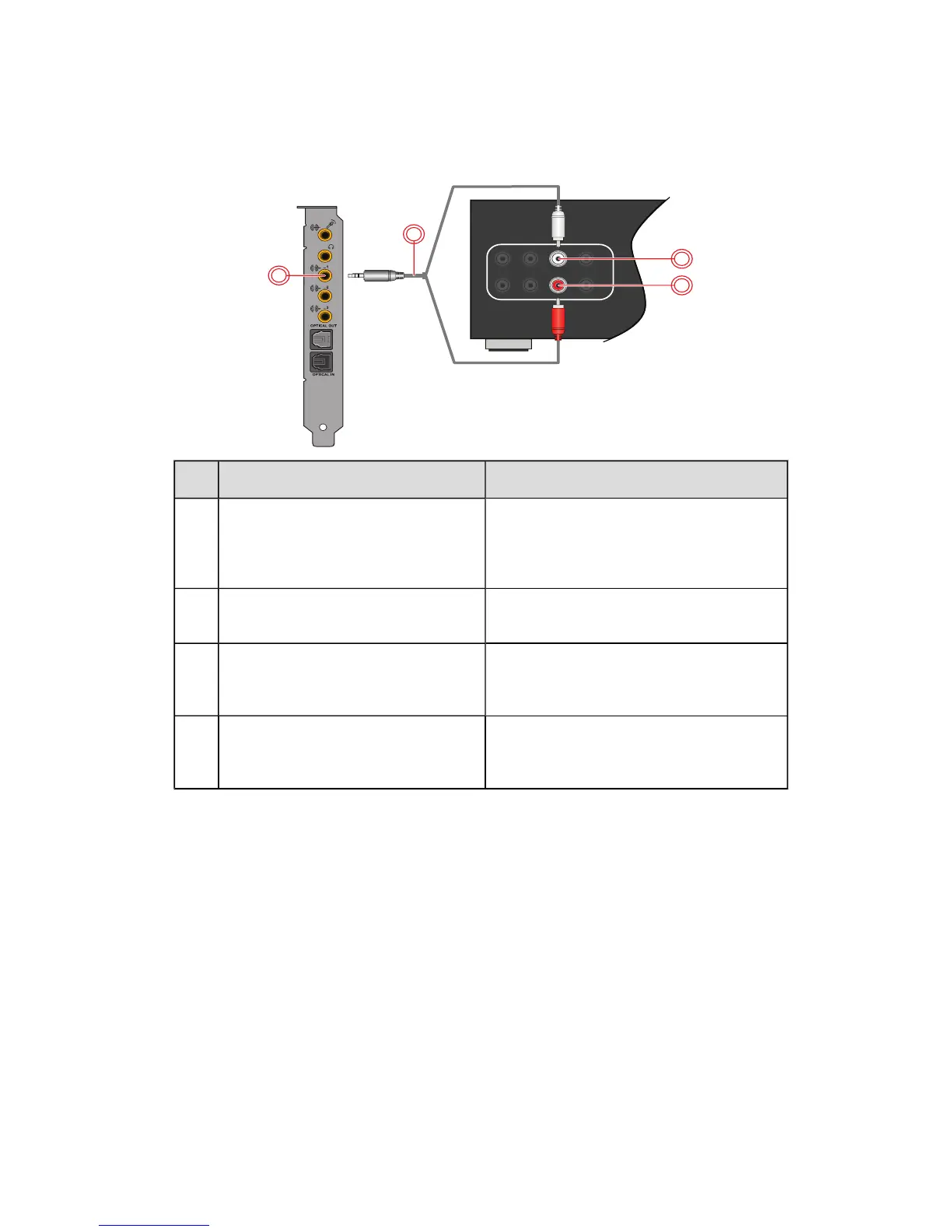
Connecting your A/V Receiver using Line Level inputs
If your A/V receiver supports multi-channel line-level inputs, you can connect them directly to your
audio card's Line Out jacks instead of the Optical S/PDIF Out jack as shown below.
Connect to Line Out 1 (Front L/R)
Jack, Connector or Cable Description
1. Line Out 1 jack (Front L/R) Connects to the Front left and Front Right
jacks on your A/V receiver, using a 3.5mm
(1/8-inch) stereo-to-RCA cable (available
separately).
2. 3.5mm (1/8-inch) stereo-to-
RCAcable (available separately)
Connects your audio card and A/V receiver.
3. Front Right jack Connects to the Line Out 1 jack on your
audio card, using a 3.5mm (1/8-inch)
stereo-to-RCA cable (available separately).
4. Front Left jack Connects to the Line Out 1 jack on your
audio card, using a 3.5mm (1/8-inch)
stereo-to-RCA cable (available separately).
Connecting Speakers and Headphones 13










 To Next Page