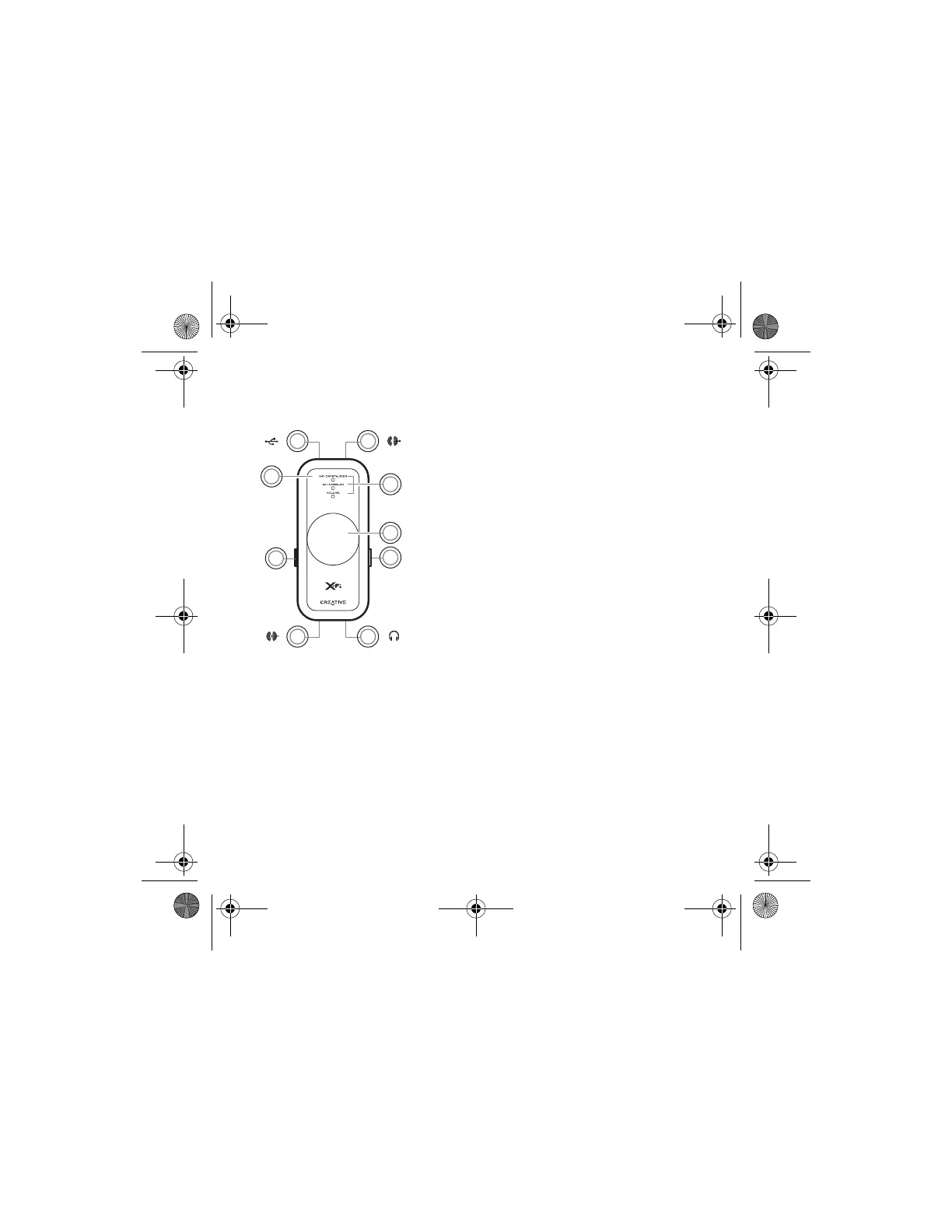
2 Your X-Fi: USB Audio
Your X-Fi: USB Audio
( )
( )
6
2 3
8 7
1
4
5
9
( )
( )
1 Select button
Press and release to switch through Volume, X-Fi
Crystalizer™ or X-Fi CMSS
®
-3D modes.
From Volume mode, press twice to adjust the X-Fi
Crystalizer level, or press three times to adjust the X-Fi
CMSS-3D level.
2 USB port
3 Line-Out jack
4LED indicators
Shows you which mode you are in. The LED flashes faster or
slower when you increase or decrease an X-Fi enhancement
level.
The volume LED lights up in red when you mute the sound.
5Level Control/Mute
Press to mute the sound. Press again to unmute.
Turn the control to increase or decrease the volume or
enhancement level.
6 X-Fi CMSS-3D switch
Slide the switch to the “On” position to enjoy the X-Fi
CMSS-3D enhancement.
7 Headphone jack
8 Line-In/Microphone jack
9 X-Fi Crystalizer switch
Slide the switch to the “On” position to enjoy the X-Fi
Crystalizer enhancement.
Wendy UG for press release.fm Page 2 Thursday, August 3, 2006 2:23 PM








 To Next Page