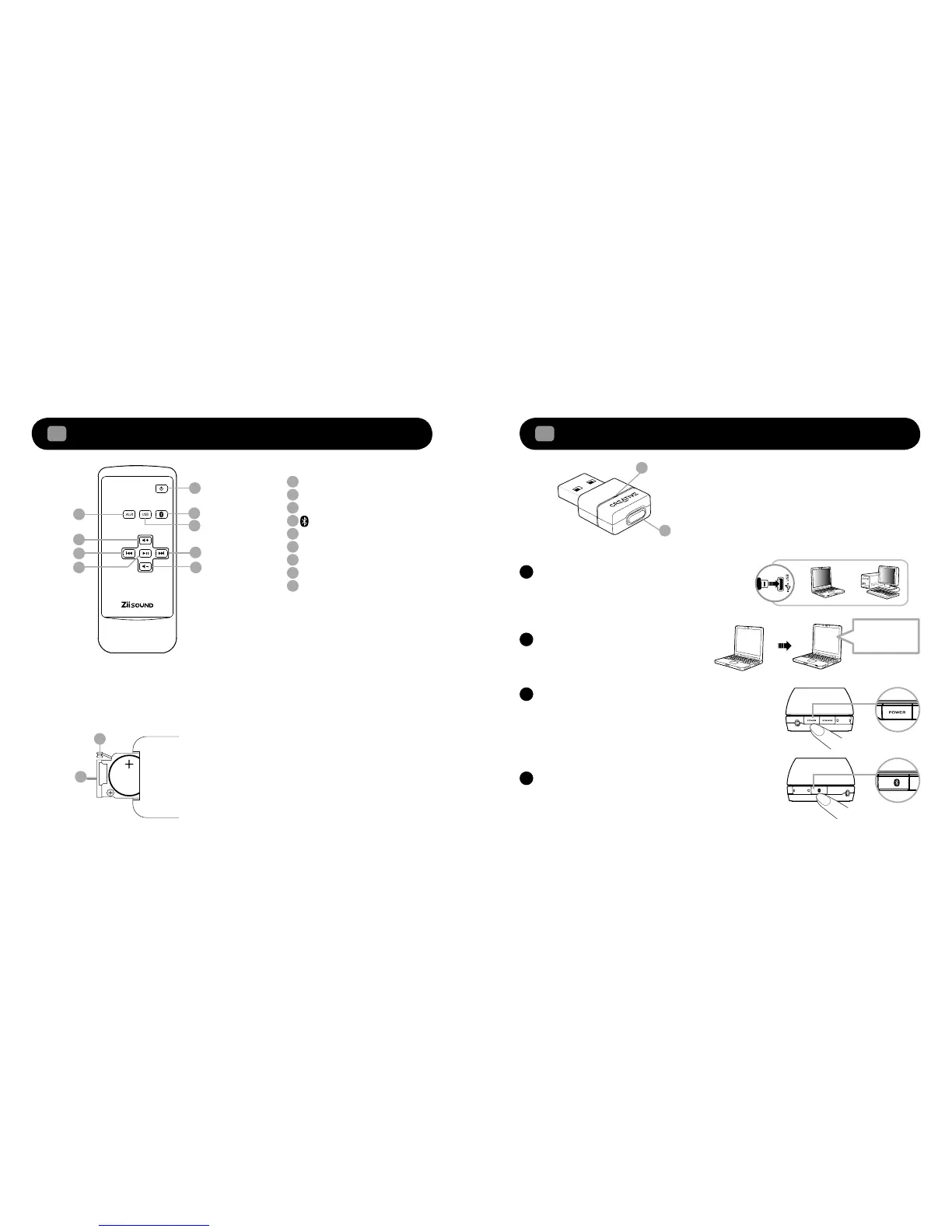
Remote Control overview
2
Power
AUX Source
USB Audio
Bluetooth
Stereo Source
Volume +
Previous Track
Play/ Pause
Volume -
Next Track
1
2
3
4
5
6
7
8
9
To replace the battery in the remote control
• Depress (A) and pull out (B)
• Replace the battery with the positive polarity facing upward and push (B) back to remote control
Enjoy high performance wireless audio from ZiiSound T6 via
Bluetooth
®
Audio Transmitter BT-D1
3
1
2
3
4
5
6
7 8
9
A
B
Bluetooth
®
Audio BT-D1 is paired with ZiiSound
T6 at factory. Simply insert the BT-D1 into your
PC to enjoy the high quality wireless audio.
A
Wait for computer to install hardwareB
Power on the speaker and the LED status
indicator will show green.
Note: Allow the flashing LED indicators to stop after
plugging the speaker system to the mains. This indicates
that the speaker system is initialized and ready to be
powered ON.
C
Press once and release the CONNECT button.
The LED will show blinking Blue then steady
Blue LED indicating ZiiSound T6 is ready to
stream music.
D
A
B
A: LED Status Indicator
Indicate the current status of the USB
Bluetooth
Transmitter
B: CONNECT button
A multi function button used to perform pairing
and disconnection
The remote control
uses a CR2025 3V
lithium coin battery









 To Next Page