Which Timer Mode is Best for Me?
The heater leaves the factory set in Out All Day mode. If you are out during the day and only
require heat in the mornings and evenings then this mode will suit your lifestyle and you won’t
need to alter anything. If you are in during the day then you should select the Home All Day
mode which is a single heating period. The User Timer mode will give you four periods of heating
split throughout the day. If you are away for an extended period then you can use the Holiday
mode. This allows you to reduce the heating during the period that you are away, reverting to the
previously selected mode on the day you return.
Advance
Sometimes you may be at home when you
had not planned to be, or need to leave when
you had planned to have the heating on. You
can change the way you use your heating
temporarily, this temporary change is achieved
by using the Advance function.
When a timer has been selected, the Advance
function allows you to begin the next period
early. If the heater is in a Comfort O period
and you want heat - press the Advance button.
If the heater is in Comfort On and you don’t
want heat, press the Advance button and it will
go o until the beginning of the next Comfort
On period.
Advance Boost
The Advance button is also used to enter the
boost mode which provides temporary heating
for one, two, three or four hours. Press the
Advance button twice to begin a one hour
boost. Continue pressing the Advance button
to enter the longer boost periods.
Main Menu
Date / Time
Options
Mode
Mode
Timer Mode
Eco Mode
Standby
Frost Protect
Manual
Timer Mode
Out All Day
Holiday
User Timer
Home All Day
Out All Day
Preview
Select
Modify
Out All Day
Select
Comfort o
12:00
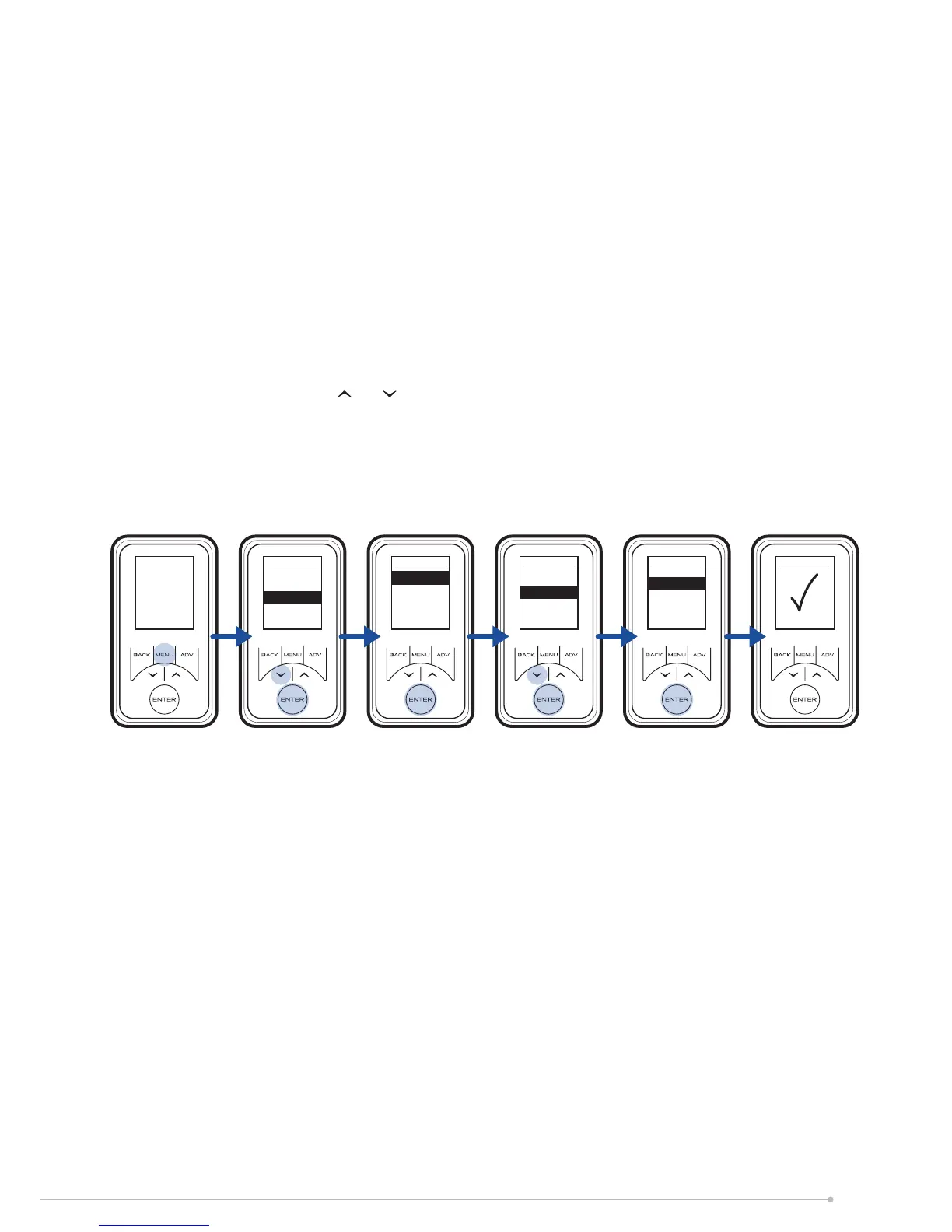
To choose a timer mode press Menu followed
by Enter to select Timer Mode. Select the
mode required by pressing or and then
Enter. For options Out All Day, Home All Day
and User Timer, three choices are available
Select, Preview and Modify.
Select - Choose this timer option
Preview - View the times currently set
Modify - Change the times currently set
Please refer to page 14 ‘Choosing and Setting
a Mode’ in these operating instructions for
information on how to modify the programmed
times.
7


 To Next Page