Cameo
™
Keypads Crestron C2N/C2NI-CB Series
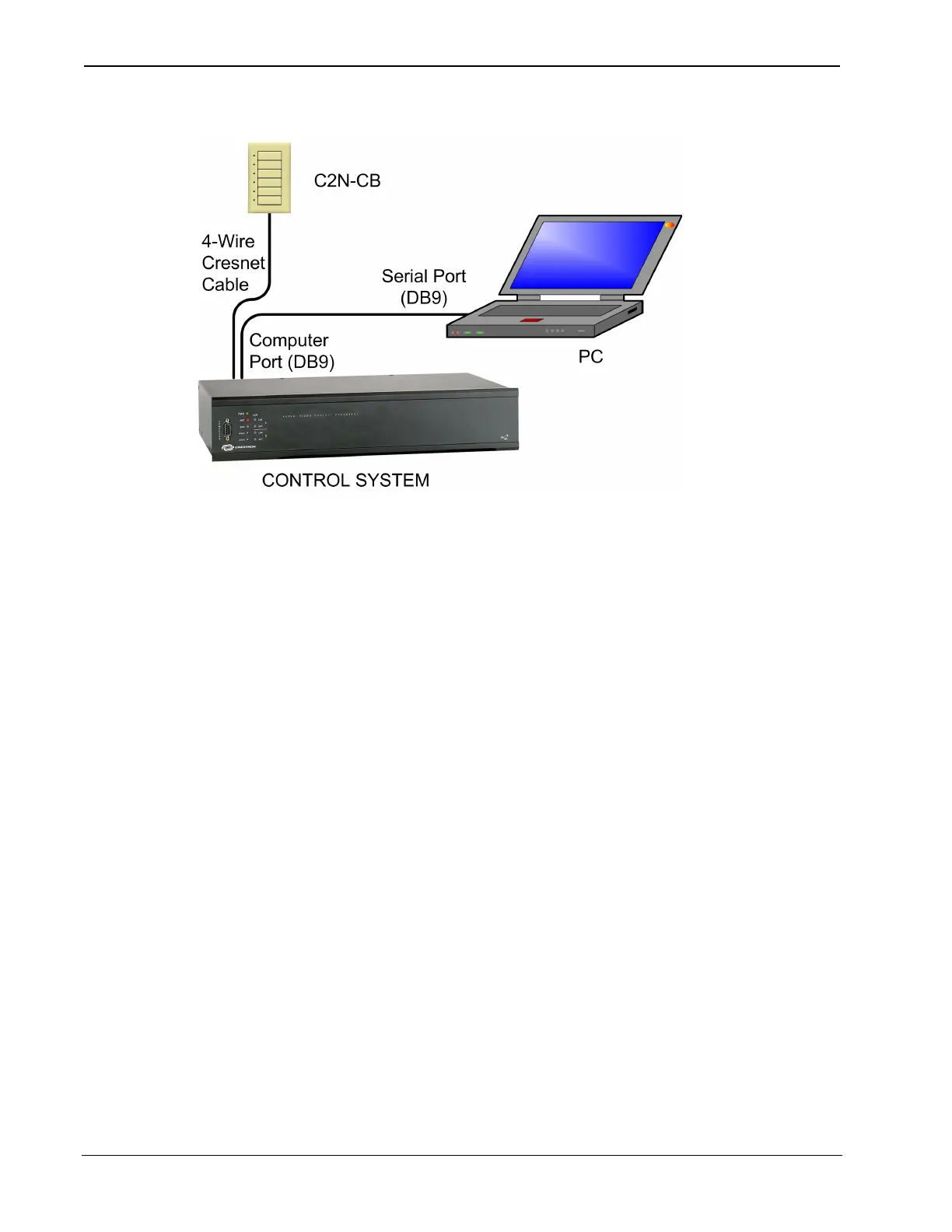
Typical Connection Diagram when Uploading
1. Open Crestron Toolbox and click Tools | Manage Address
Book to display a list of available devices. Select Serial on
COM1 as the connection type. Serial on COM1 is an entry in
the DefaultAddressBook that is included with Crestron
Toolbox.
The PC communication settings specified here should match
the protocol that the control processor expects. The usual
settings are as follows:
• Port = COM 1 through COM 8. Select the correct COM port
on the PC.
• Baud rate = Auto-detect.
• Parity = None.
• Number of data bits = 8.
• Number of stop bits = 1.
• Hardware handshaking (RTS/CTS) enabled.
• Software handshaking (XON/XOFF) not enabled.
30 • Cameo™ Keypads: C2N/C2NI-CB Series Operations & Installation Guide - DOC. 6346A


 To Next Page