Connect the DMC Cards
DMC cards consist of the DMC-CPU3 card and various input and output
cards. The DMC-CPU3 card is included with the switchers. The input and
output cards are sold separately and are installed at the factory prior to
shipment of the switchers.
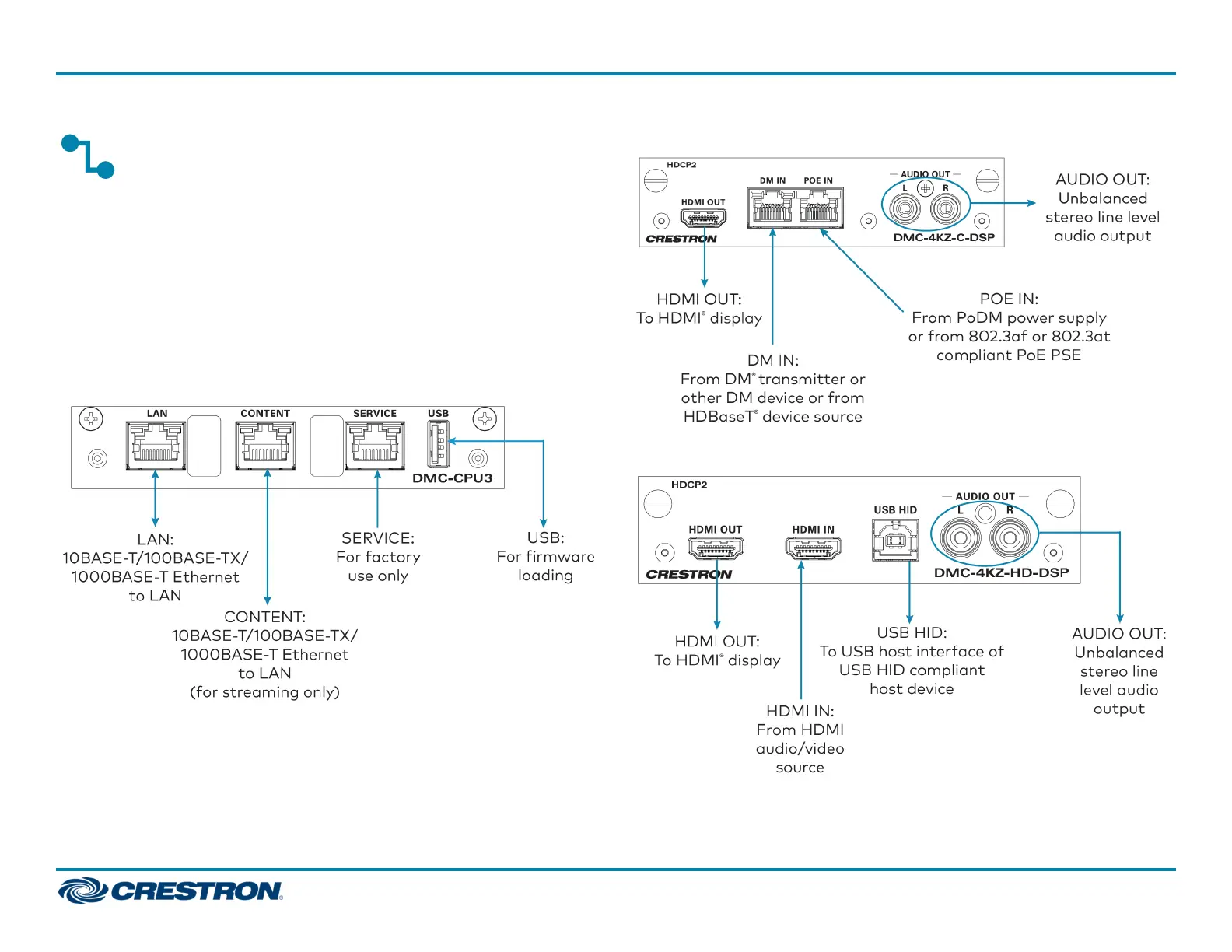
Connect the DMC-CPU3 Card
The following illustration provides information about connections to the
DMC-CPU3 card.
DMC-CPU3 Card
Connect Input Cards
The following illustrations provide information about connections to two
of the available input cards: DMC-4KZ-C-DSP and DMC-4KZ-HD-DSP.
DMC-4KZ-C-DSP Input Card
DMC-4KZ-HD-DSP Input Card
3
DM-MD8X8/16X16/32X32-CPU3(-RPS)
QuickStart
DigitalMedia™ Switchers



 To Next Page
 Loading...










