EasyManua.ls Logo

Crestron DIN-TSTAT-FCU - User Manual

Crestron DIN-TSTAT-FCU
52 pages
Print Icon
To Next Page IconTo Next Page
Loading...
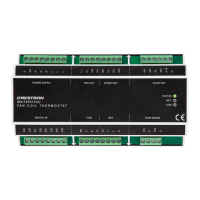
DIN-TSTAT-FCU
DIN-Rail Heating and Cooling Fan-Coil
Thermostat
Setup and Commissioning Guide
Crestron Electronics, Inc.

Other manuals for Crestron DIN-TSTAT-FCU

Questions and Answers

  • A
    Andrew HarrisAug 15, 2025
    What to do if the local room display unit is off on Crestron DIN-TSTAT-FCU Thermostat?
    • M
      Matthew BaldwinAug 15, 2025
      If the local room display unit of your Crestron Thermostat is off while the device is turned on, verify the presence of either main or Cresnet power supplies. Reconnect the communication cable and check the communication wiring. If the COM LED indicator is off, check the communication parameters on the DIN-TSTAT-FCU. You can also use Monitoring mode to check the Modbus parameters error variable.
  • C
    Connie JohnsonAug 18, 2025
    Why are the local room display unit functions not working on my Crestron Thermostat?
    • D
      Dustin JacksonAug 18, 2025
      If the local room display unit functions of your Crestron Thermostat aren't working properly, such as fan speed, mode change, or set point change, check the traffic on Cresnet network. Also, if there is an error in the fan speed wiring, check the fan speed wiring. Check the main power supply and the valve wiring, if there is an error in the main power supply wiring.
  • C
    Cindy RobinsonAug 21, 2025
    Why are the alarms triggered too fast on Crestron DIN-TSTAT-FCU?
    • A
      Aaron WebbAug 21, 2025
      If the alarms on your Crestron Thermostat are triggered too fast or too slow, check the selected alarm delay using the DIN-TSTAT-FCU Configuration Tool. Also, check the alarm wiring.
  • M
    Morgan ZimmermanAug 25, 2025
    What to do if a valve is off on Crestron Thermostat?
    • M
      Marvin AndersonAug 25, 2025
      If a valve is off or inactive on your Crestron Thermostat, check the main power supply and the valve wiring, because the valve output wiring might be incorrect.
  • K
    kathryn83Aug 27, 2025
    How to troubleshoot LED indicators being off on Crestron DIN-TSTAT-FCU Thermostat?
    • N
      nathanielpetersonAug 27, 2025
      If the LED indicators are off on your Crestron Thermostat upon power up, check the AC and Cresnet wiring. Ensure that the Cresnet connection is properly made. Turn off the device, reconnect the wiring, and power up the device again. Using a voltmeter, check if voltage between the EP and G pins is 20 Vdc.
  • S
    spetersonAug 30, 2025
    Why is the fan always operating on my Crestron DIN-TSTAT-FCU?
    • K
      Kyle FowlerAug 30, 2025
      If the fan is always operating on your Crestron Thermostat, it might be due to an incorrect reading from the temperature probe.
  • R
    Robert NunezSep 2, 2025
    What to do if the fan is off when the fan speed is set to 1 on Crestron Thermostat?
    • M
      Michele MezaSep 2, 2025
      If the fan is off when the fan speed is set to 1 on your Crestron Thermostat, check if the appropriate FCU type is selected.
  • M
    Mr. James CantuSep 5, 2025
    What to do if the valve remains in the open position on Crestron Thermostat?
    • D
      davidmurraySep 5, 2025
      If the valve remains in the open position on your Crestron Thermostat, check the measured temperatures, selected operating mode and alarm states using the DIN-TSTAT-FCU Configuration Tool in Monitoring mode.
  • A
    April CookSep 8, 2025
    Why are the alarms always active on my Crestron Thermostat?
    • B
      Bruce MorganSep 8, 2025
      If the alarms are always active on your Crestron Thermostat, check the binary input and the alarm statuses using the DIN-TSTAT-FCU Configuration Tool in Monitoring mode. Use the force option to place the input in the desired state.
  • T
    Tyler VaughnSep 12, 2025
    Why does the fan not change speed on my Crestron Thermostat?
    • C
      Crystal ChurchSep 12, 2025
      If the fan does not change speed on your Crestron Thermostat, read the fan speed change delay parameter value using the DIN-TSTAT-FCU Configuration Tool, and wait for time equal to the set value. Also, read the Fan speed OFF enable parameter value using the DIN-TSTAT-FCU Configuration Tool, because the wrong operating mode might be active.

Crestron DIN-TSTAT-FCU Specifications

General IconGeneral
TypeThermostat
DisplayLCD
CommunicationCresnet
Temperature Range32°F to 122°F (0°C to 50°C)
Humidity Range5% to 95% RH (non-condensing)
Relative Humidity5% to 95% RH (non-condensing)

Related product manuals