EasyManua.ls Logo

Crestron DM-TX-401-C - User Manual

Crestron DM-TX-401-C
4 pages
Print Icon
To Next Page IconTo Next Page
Loading...
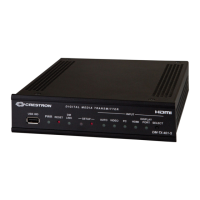
The Crestron® DM-TX-401-C provides a versatile interface for computers
and high-definition AV sources.
In the Box
1 DM-TX-401-C, DigitalMedia 8G+ Transmitter 401
Additional Items
1 Connector, 2-pin (2003574)
1 Connector, 5-pin (2003577)
Install the Transmitter
The DM-TX-401-C can be mounted into a rack, attached to the underside
of a table, or placed onto a flat surface. To mount the device into a rack,
use the ST-RMK Rack Mount Kit (sold separately). To attach the device to
the underside of a table, use the UTK-1U-HALF Under-Table Mounting Kit
(sold separately).
1
DM-TX-401-C
QuickStart
Digitalmedia 8G Transmitter 401

Other manuals for Crestron DM-TX-401-C

Question and Answer IconNeed help?

Do you have a question about the Crestron DM-TX-401-C and is the answer not in the manual?

Overview

The Crestron DM-TX-401-C DigitalMedia 8G+® Transmitter 401 is a versatile interface designed to integrate computers and high-definition AV sources into a DigitalMedia system. It facilitates the transmission of various audio and video signals over a single DigitalMedia 8G+ or HDBaseT connection, simplifying cabling and system design.

Function Description:

The DM-TX-401-C acts as a transmitter, taking multiple input signals from different sources and converting them for transmission over a DigitalMedia 8G+ or HDBaseT link. It supports a wide range of input types, including HDMI®, DisplayPort™, VGA, composite video, and various audio formats. The device is designed to work seamlessly within a Crestron DigitalMedia system, either connected to a DM switcher or directly to a DM 8G+ receiver in a standalone configuration.

Important Technical Specifications:

  • Input/Output Ports:
    • DM OUT: This is the primary output port, supporting PoDM (Power of DM) or HDBaseT® PoE (Power over Ethernet) PD (Powered Device). It connects to a DM switcher, receiver, or other HDBaseT device. It's crucial to note that any wiring connected to a PoDM or HDBaseT PoE PSE port is for intrabuilding use only and should not be connected to a line that runs outside the building where the PSE is located.
    • AUDIO IN L, R: Unbalanced stereo line-level audio input.
    • AUDIO IN: Unbalanced stereo line-level audio input (likely a duplicate or alternative to the L, R input, depending on context).
    • COM: RS-232 port for control of external devices (e.g., projectors) or for receiving control commands.
    • IR: Port for connecting to an IR device (e.g., projector) or a device without RS-232 for control.
    • VID: Composite video input.
    • HDMI: HDMI® audio/video input from an HDMI source.
    • PC: RGB or component video input.
    • DISPLAY PORT: DisplayPort™ digital video/audio input.
    • USB HID: For connecting a mouse/keyboard or a Crestron TT-100 series device.
    • LAN: 10BASE-T/100BASE-TX Ethernet to a local network device.
    • 24V - 0.75A: Power input from an optional PW-2407WU power pack (sold separately).
  • Power: The DM OUT port is a PD (Powered Device) port, meaning it can receive power over the DM or HDBaseT connection from a PSE (Power Sourcing Equipment) port on a DM switcher or other compatible device. An optional PW-2407WU power pack can also be used for local power.
  • Mounting Options: The DM-TX-401-C can be mounted in a rack using the ST-RMK Rack Mount Kit (sold separately), attached to the underside of a table using the UTK-1U-HALF Under-Table Mounting Kit (sold separately), or simply placed on a flat surface.
  • IP Address Configuration:
    • When connected to a DM switcher, the IP address is configured automatically by the switcher.
    • In a standalone configuration (connected directly to a DM 8G+ receiver), the IP address is assigned via DHCP by default.
    • A static IP address can be assigned by holding down the SETUP button during boot-up (default static IP: 192.168.1.234) or manually set using the Crestron Toolbox™ application.

Usage Features:

  • Automatic Input Switching: By default, the device supports automatic switching of inputs based on priority.
    • Video switching priority: DisplayPort™, HDMI, RGB, composite.
    • Audio switching priority: DisplayPort, HDMI, 1/8 in. analog, dual RCA analog.
    • The AUTO LED on the front panel indicates when automatic switching is enabled.
  • Manual Input Selection: Users can manually select the desired audio/video input by pressing the SELECT button on the front panel. Pressing the SELECT button cycles through the available inputs in a specific order:
    1. DisplayPort audio and video (DISPLAY PORT LED lights).
    2. HDMI audio and video (HDMI LED lights).
    3. VGA video with 1/8 in. audio (PC LED lights).
    4. Composite video with dual RCA audio (VIDEO LED lights).
    5. None (no input selected). After cycling through all selections, pressing SELECT again returns the device to automatic switching.
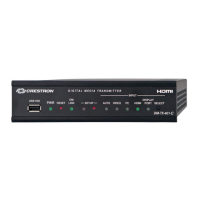
  • Front Panel Indicators: The front panel includes LEDs for USB HID, PWR, RESET, LINK, -SETUP-, AUTO, VIDEO, PC, HDMI, and DISPLAY PORT, providing visual feedback on the device's status and current input selection.
  • Versatile Interface: The DM-TX-401-C provides a comprehensive set of inputs, making it suitable for various presentation and collaboration environments where multiple source types need to be integrated.

Maintenance Features:

  • Crestron Toolbox™ Application: This software tool can be used for advanced configuration, including manually setting static IP addresses, and potentially for firmware updates and diagnostics.
  • Reset Button: A physical RESET button is available on the front panel for restarting the device.
  • Firmware Updates: While not explicitly detailed in this document, Crestron devices typically support firmware updates to introduce new features, improve performance, and address any issues. These updates are usually performed via the Crestron Toolbox™ application or a DM switcher.
  • Product Page and QR Code: A QR code is provided to quickly access the product page on crestron.com, which likely contains the latest documentation, drivers, and support information.
  • Warranty and Legal Information: Crestron provides a product warranty, and information regarding software licenses, patents, and open-source software is available on their website, ensuring transparency and support for the device.

Crestron DM-TX-401-C Specifications

General IconGeneral
BrandCrestron
ModelDM-TX-401-C
CategoryTransmitter
LanguageEnglish

Related product manuals