PROCISE™ Surround Sound Processor Crestron PSPHD
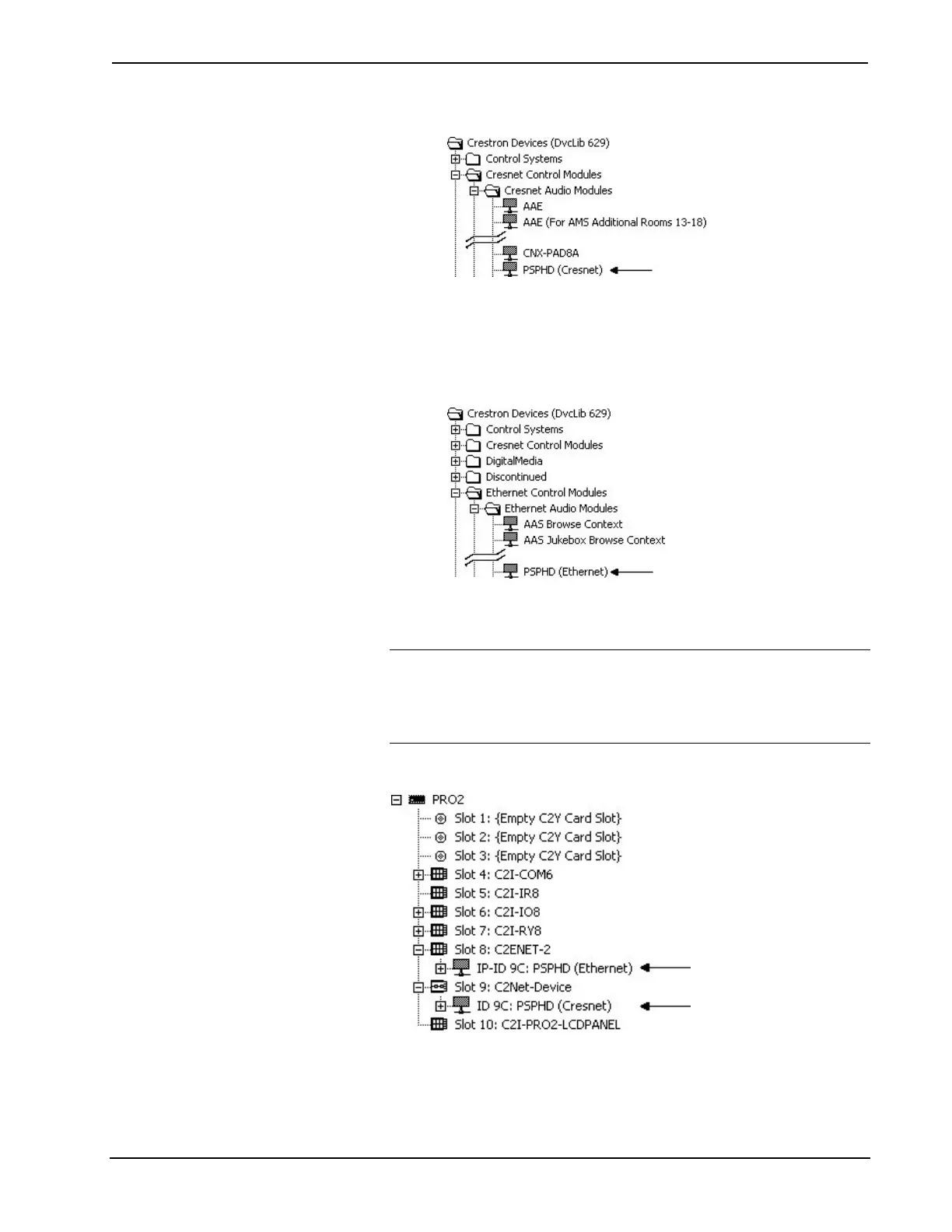
Locating the PSPHD (Cresnet) in the Device Library
• Ethernet:
Drag the PSPHD from the Ethernet Control Modules | Ethernet
Audio Modules folder of the Device Library and drop it in the
System Views.
Locating the PSPHD (Ethernet) in the Device Library
2. The system tree of the control system displays the device in the appropriate
slot(s) with a default Net ID or IP ID as shown in the following illustration.
NOTE: In the following illustration, there is both an Ethernet device in
Slot 8 and a Cresnet device in Slot 9. It is possible to have both types of
device attached to a control system as long as the control system has either
a built-in or expansion Ethernet interface. If Cresnet operation is desired,
the IP table for the PSPHD must be empty.
PSPHD Device, Slots 8 and 9
3. Additional PSPHD devices are assigned different Net ID or IP ID numbers
as they are added.
48 • PROCISE™ Surround Sound Processor: PSPHD Operations Guide – DOC. 6837B


 To Next Page