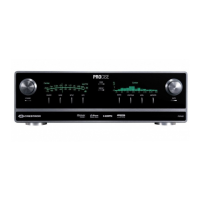
PROCISE™ Surround Sound Processor Crestron PSPHD
Surround Sound Decoding Mode Selection
Surround sound Decoding modes can be applied to an incoming audio signal. To
select a Decoding mode:
1. Press the MODE button.
2. Turn the selection knob until the desired Decoding mode is displayed.
3. Press the selection knob to confirm the Decoding mode.
NOTE: Some signals are not compatible with all Decoding modes.
4. Press HOME to return to the home display.
Setup
The PSPHD can be set to apply compression, Audyssey Dynamic EQ
®
, and
Audyssey MultEQ
®
to an incoming signal. The PSPHD can also be set to adjust the
bass and treble levels of the incoming audio signal.
NOTE: Until Audyssey calibration has been performed, the PSPHD front panel will
show a message every few seconds indicating that the system should be calibrated.
Compression
The PSPHD can apply Audyssey Dynamic Volume Compression or Dolby/DTS
DRC Compression to the audio signal.
NOTE: The Audyssey MultEQ function must be enabled prior to enabling the
Audyssey Dynamic Volume™ Compression. For information on enabling Audyssey
MultEQ, refer to “Audyssey MultEQ” on page 56.
To select a compression setting:
1. Press the SETUP button to display Compression.
Compression Setting
SETUP
Compression is Off
SOURCE MODE SETUP INFO
54 • PROCISE™ Surround Sound Processor: PSPHD Operations Guide – DOC. 6837B


 To Next Page