l
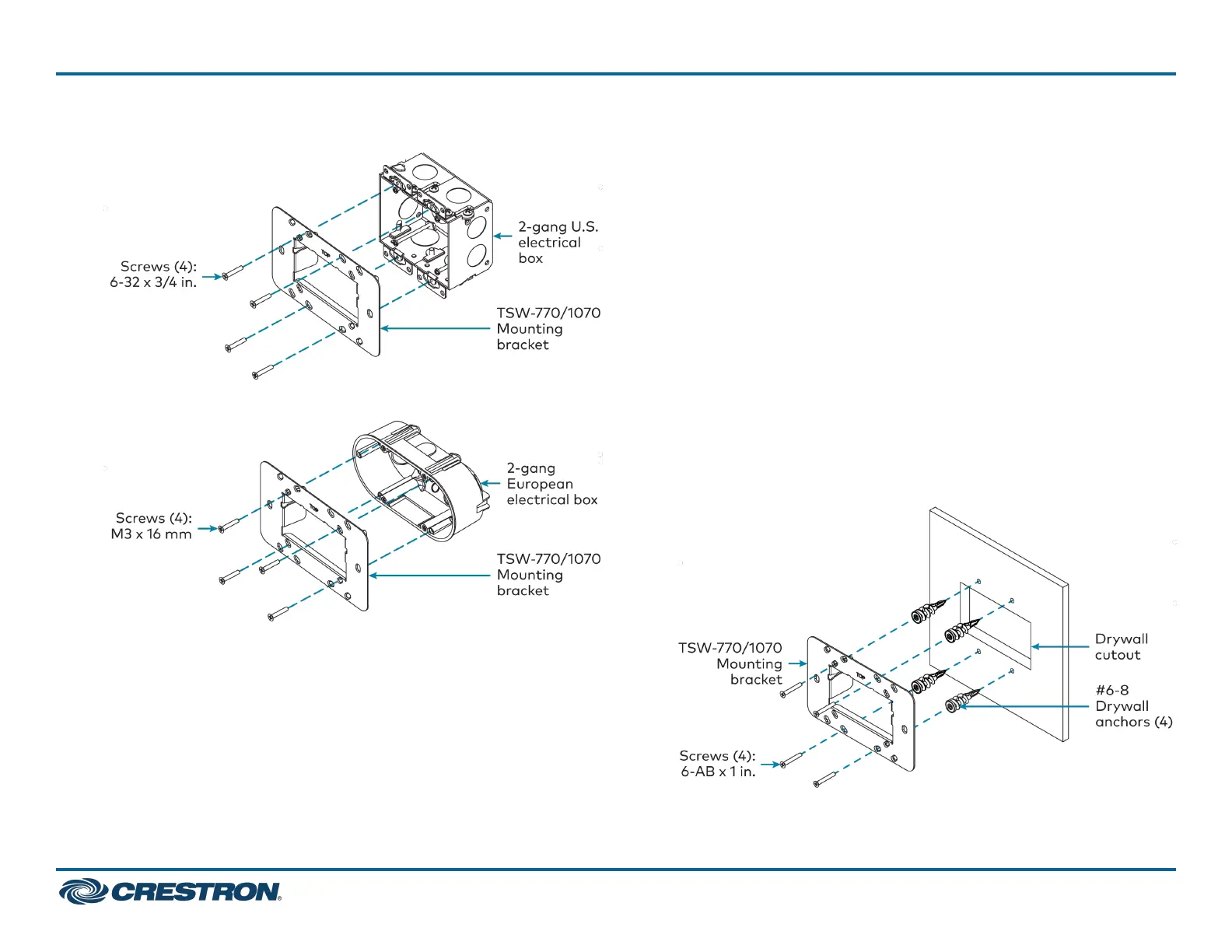
For U.S. installations, use the four 6-32x3/4in.screws.
l
For European installations, use the four M3x16mmscrews.
l
For U.K. installations(notpictured),usethetwoM3.5x25mm
screws to attach the mounting bracket to the electrical box. Insert
the screws through the center openings in the left and right sides of
the mounting bracket.
Drywall Mounting
Mounting hardware is provided with the touch screen for drywall
installations without an electrical box. Using this hardware will ensure
that the bracket is completely flush with the touch screen to provide
maximum magnetic force.
To install the mounting bracket into drywall:
1. Using the inside of the mounting bracket as a template, cut a
2–1/8 x 3-5/8 in. (54 x 92 mm)holeintothedrywall.Ensurethe
template is level prior to cutting the hole.
2. Align the mounting bracket with the cutout and ensure it is level.
3. Use one of the anchors to make a center mark in the drywall through
the four 2-gang openings in the template. Refer to the image below
for the required mounting holes.
4. Screw the four anchors into the drywall using the center marks as a
reference.
5. Attach the mounting bracket to the anchors using the four 6-ABx
1in.screwsasshownintheimagebelow.
4
TSW-570, TSW-770, and TSW-1070
QuickStart
5 in., 7 in., and 10.1 in. Wall Mount Touch Screens



 To Next Page
 Loading...









