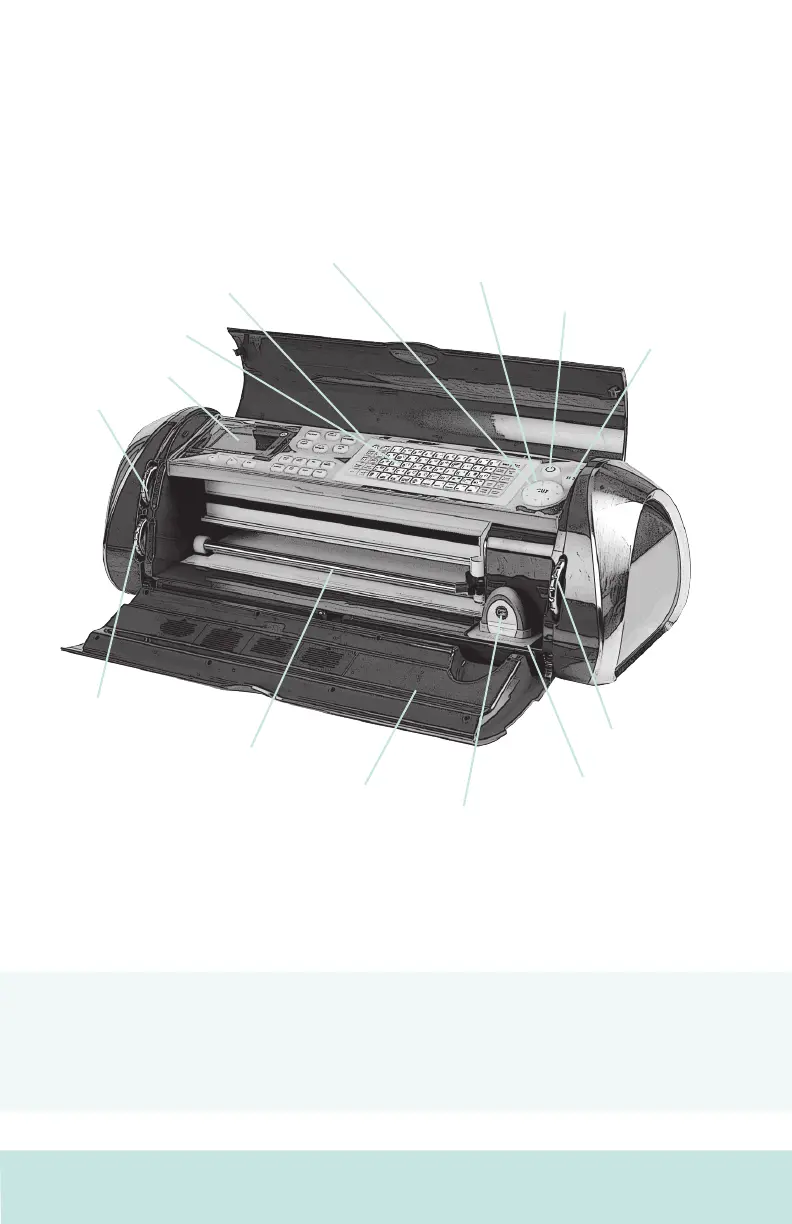
The Cricut Cake™ 24" Personal Electronic Cutter™
The illustration below will help you become familiar with your Cricut Cake™
machine. All the buttons, keys, and components shown will be described in more
detail later on.
WARNING! Disconnect electrical power before servicing or cleaning. DO NOT place
your ngers or other objects in the Cricut Cake™ machine while connected to electri-
cal power, powered on, or during cutting operations. Rapid movements of the cutting
carriage during operation may cause bodily injury and/or damage to the Cricut
Cake™ machine.
Display Screen
CUT Button
On Button
Blade Navigation
Buttons
Keypad
Keypad Protector
Speed Dial
Pressure Dial
Door
Roller Bar
Cartridge
Size Dial
Cartridge Skirt
STOP Button
8 ENGLISH













 To Next Page