16 Cricut DesignStudio™ • www.cricut.com
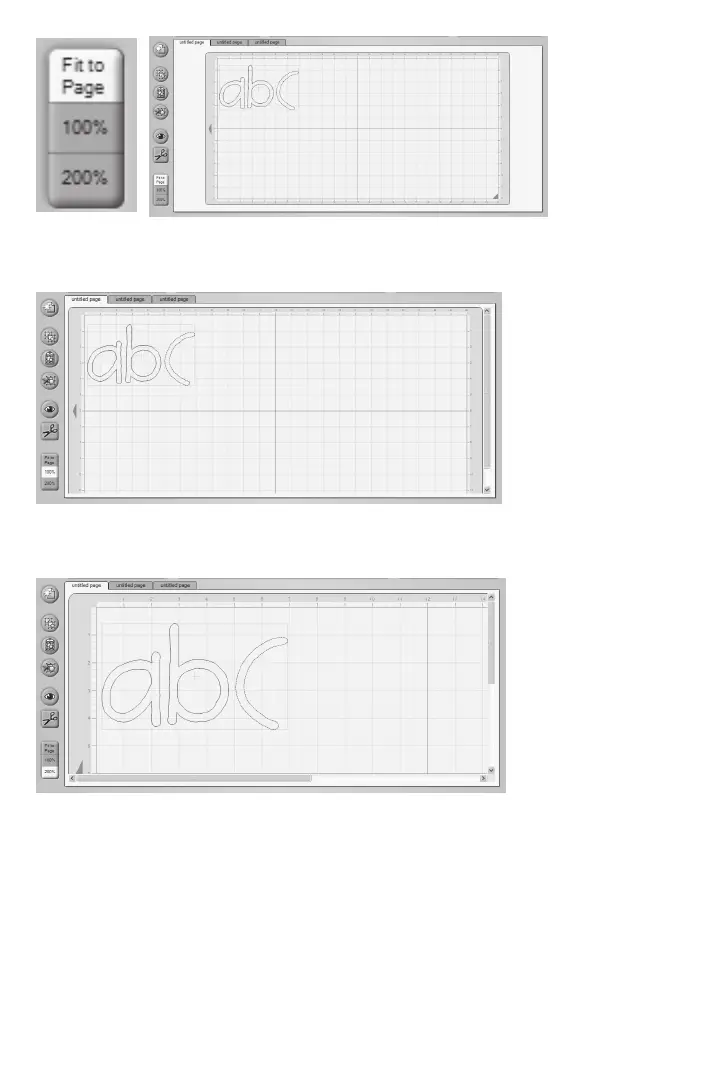
Fit to Page
Clicking the Fit to Page button will reset the mat zoom level so that the entire mat can be
seen. This is a great way to survey everything you’ve selected and how it’s all arranged.
100% View
Clicking the 100% button will reset the mat zoom level so that you will see your selected char-
acters at 100% of their natural size. This is great way to compare characters to each other.
200% View
Clicking on the 200% button will reset the mat zoom level so that you will see your selected
characters at 200% of their natural size. This is a great way to take a closer look at charac-
ter details.
Tip: To view an individual character without the handles (see page 19), select the character
and then hold down Alt. This will temporarily remove the handles to give you a clearer view.












 To Next Page