Cricut DesignStudio™ • www.cricut.com 17
Pages
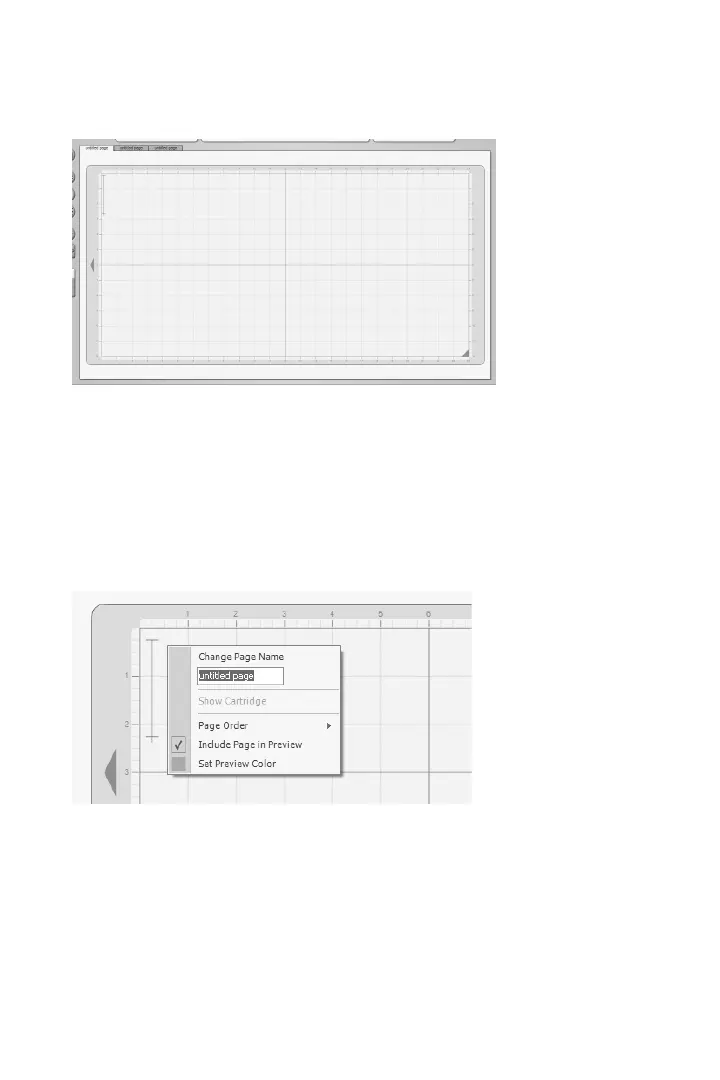
Pages in the Cricut DesignStudio are essentially virtual cutting mats. Multiple pages can be
saved as one project.
Tip: Naming each individual page in a multi-page project makes it easier to navigate to
any desired page. To change the name of the currently selected page, right-click
anywhere on the mat to bring up page options. See Page Options below.
On-Screen Virtual Cutting Mat
In the Cricut DesignStudio software, the mat page is your workspace. The on-screen cut-
ting mat, in its three sizes (6" x 12", 12" x 12", 12" x 24"), is identical to the real Cricut cutting
mat. One of the powerful benets of using the Cricut DesignStudio software is being able
to see all your character selections laid out on the mat all at once, and having the ability
to adjust and alter character properties before actually cutting anything. With the on-
screen cutting mat, What You See Is What You Cut!
Page Options
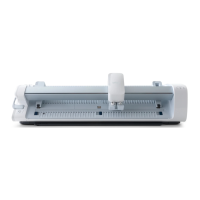
You can use Page Options to customize the way you access and organize your layouts
and projects. To bring up page options, right-click anywhere on the mat.
Change Page Name
Use this eld to enter in a name for your currently selected page, then hit the Enter key or
click on Change Page Name to make it stick.












 To Next Page