EN - 15
(The images are representative)
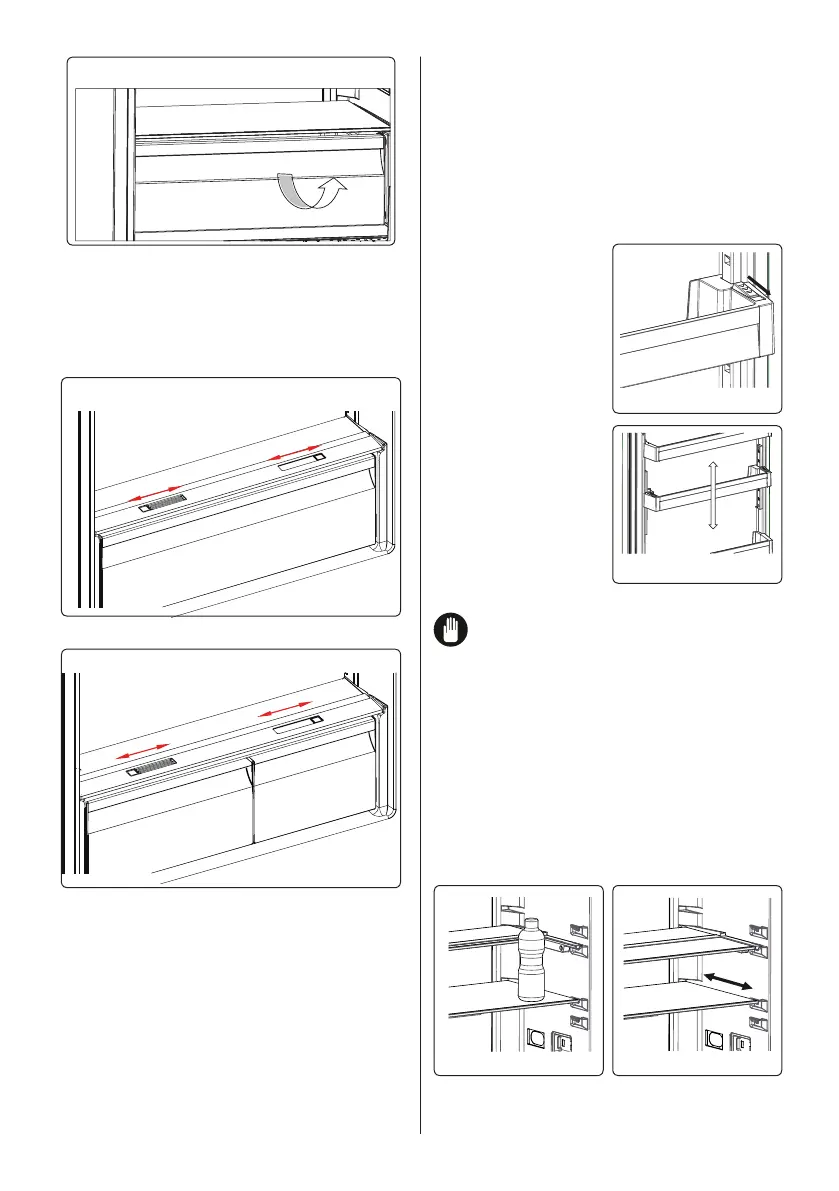
• Pull the chill drawer towards you by
sliding it on the rails.
• Pull the chill drawer up from the rail and
remove it from the fridge.
3.5.4 The Fresh Dial (In some models)
(The images are representative)
or
(The images are representative)
If the crisper is full, the fresh dial located
in front of the crisper should be opened.
This allows the air in the crisper and the
humidity rate to be controlled, to increase
the life of food within.
The dial, located behind the shelf, must be
opened if any condensation is seen on the
glass shelf.
This glass shelf with humidity control must
be loaded with a maximum of 32 lbs
3.5.5 Adjustable Door Shelf (In some
models)
Six dierent height adjustments can be
made to provide storage areas that you
need by adjustable door shelf.
To change the position of adjustable door
shelf ;
Hold the bottom of the shelf and pull the
buttons on the side of
the door shelf
direction of arrow.
(Fig.1)
Position door shelf
the height you need
by moving up and
down. After you get
the position that you
want the door shelf,
release the buttons on
the side of the door
shelf (Fig.2) Before
releasing the door
shelf, move up down
and make sure the
door shelf is xed.
Note: Before moving door shelf is
loaded, you must hold the shelf by
supporting the bottom. Otherwise, door
shelf could fall o the rails due to the
weight. So damage may occur on the door
shelf or rails.
3.5.6
Adjustable Glass Shelf (In some
models)
Adjustable glass shelf mechanism provides
higher storage spaces with a simple
movement. To cover the glass shelf, push
it.
Fig. 1
Fig. 2
You can load your food as you want in the
resulting extra space. To bring the shelf in
its original position, pull it toward you.
Fig. 1
Fig. 2



 To Next Page