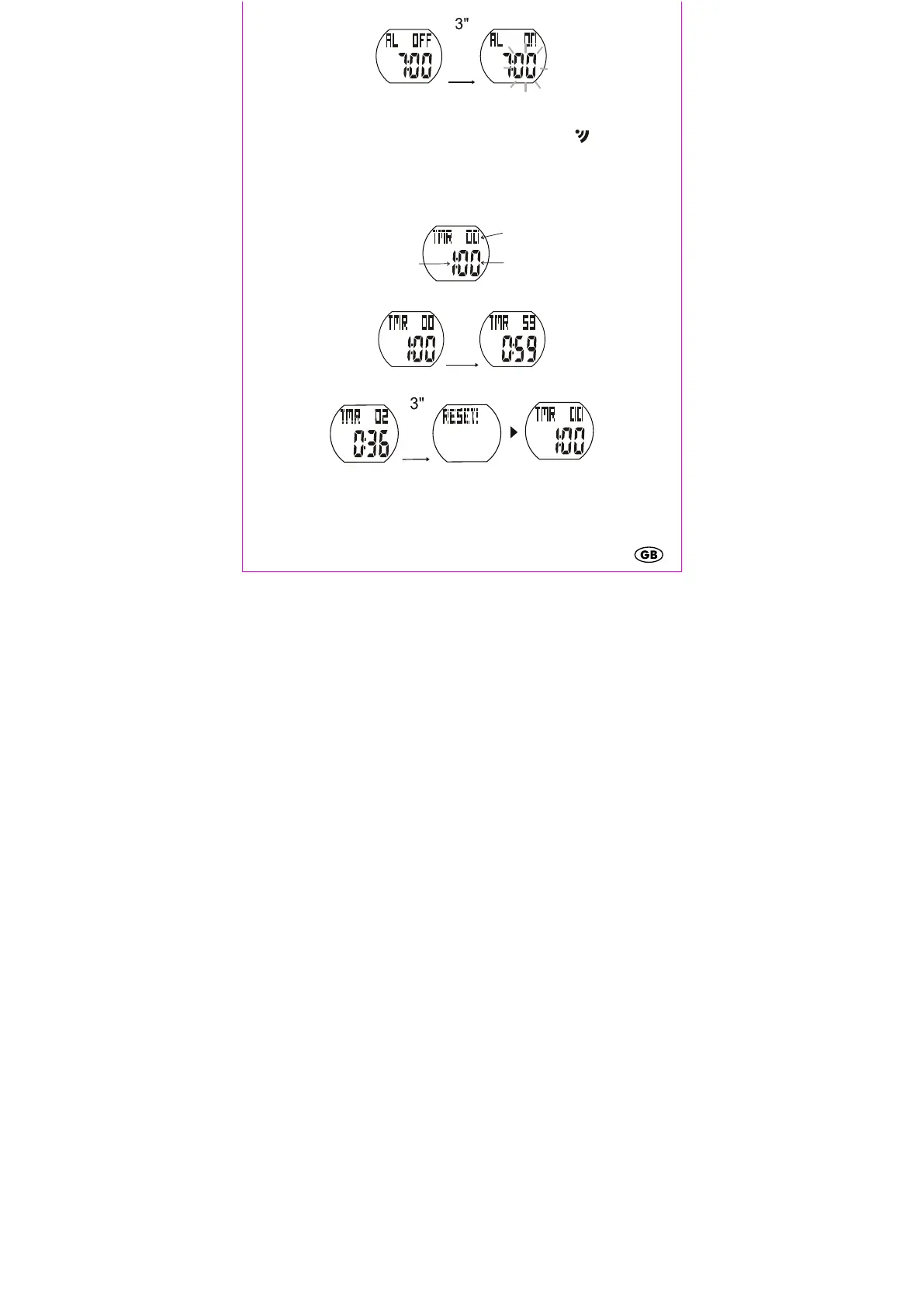
Activating/deactivating the alarm and the snooze feature
Press any button when the alarm sounds to turn off the alarm. If the alarm is not
turned off within 30 seconds, the snooze feature will activate. The -symbol will
blink on the display and the alarm will sound again after 5 minutes. This will be
repeated 3 times. After 24 hours the alarm will sound again.
3. TIMER (countdown) max. 23:59:59
The preset time of 1:00 hour will appear on the display.
Press SET while in TIMER mode to start or stop the timer.
Press and hold SET for 3 seconds to reset the TIMER.
Press and hold SET again for 3 seconds to set a custom time for the TIMER. The
hours will blink. Press SET/LIGHT to set the hours and confirm your setting by
pressing SEL. The minutes will blink on the display. Set the minutes and seconds in
the same manner. Confirm by pressing MODE.


 To Next Page