16
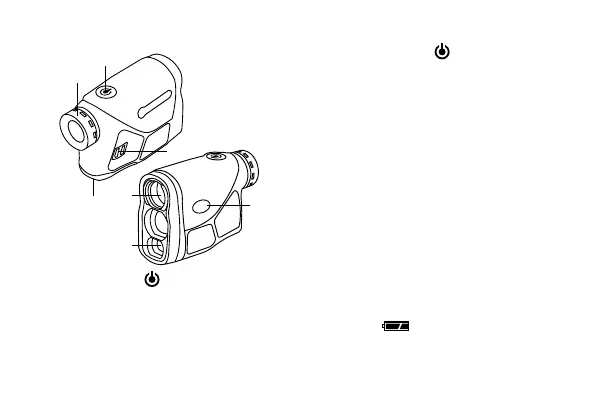
PARTS OVERVIEW
MODE
B
A
D
C
E
F
G
A. Power button
B: Eyepiece cover (focus wheel)
C. Battery compartment cover
D. Strap holder
E. Objective lens
F. Laser reception objective
G. Mode button (
)
START THE DEVICE
Hold the power button
for about 1 sec-
ond. On first startup the display will enter
the default standard ranging mode.
The next time you start the device you will
always start with the last mode used.
The device switches off automatically after
30 seconds of inactivity.
DIOPTER ADJUSTMENT
If the display is out of focus, the focus can
be adjusted by turning the eyepiece cover
(focus wheel) to the left or right.
LOW POWER WARNING
When the battery power is too low, the low
battery icon is displayed to remind
you to change the battery.


 To Next Page