BLUETOOTH® WIRELESS MODE
Use the Bluetooth® wireless mode function as an alternative to wired
communication.
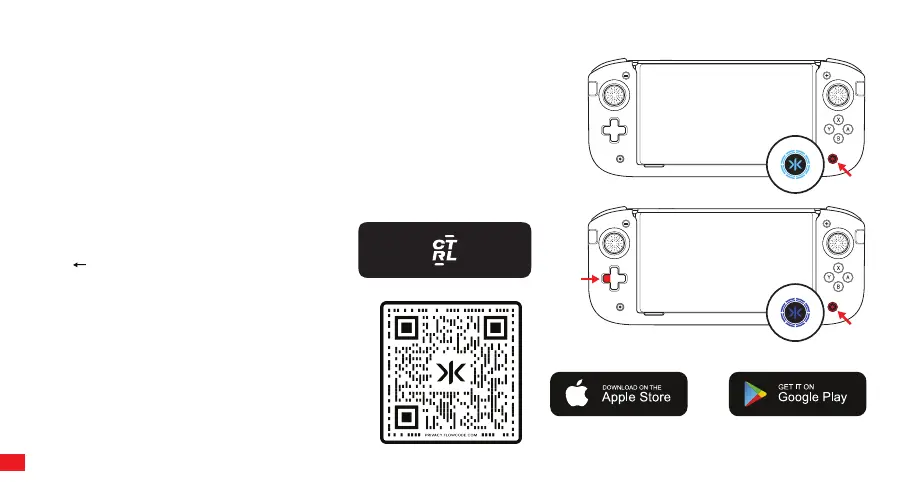
Press and hold Home (CRKD) button for 3 seconds. The Home (CRKD) button will
flash Cyan and turn solid.
To leave wireless mode, press and hold the Home (CRKD) button for 3 seconds.
The CRKD LED will turn white to signify you are back in handheld mode.
Reprogram Nitro Deck+ or update firmware using
the CRKD CTRL feature in the CRKD app. Tap
CTRL in the app and when prompted Press and
Hold Dpad + Home (CRKD) Button for 3
seconds. The Home (CRKD) Button LED will blink
fast in blue and when connected it will continue
to blink slow in blue while in CRKD CTRL.
CONNECTING TO CRKD CTRL
The Nitro Deck+ contains an RFID touchpoint. Use the
CRKD app and an NFC-antenna enabled smartphone
to add the Nitro Deck+ to your collection. The CRKD
app includes complete instructions and videos on how
to tap your device. Scan the QR code to download
the CRKD app.
TAP AND COLLECT
11



 To Next Page