EasyManua.ls Logo

Crosley CO1011A - User Manual

Crosley CO1011A
6 pages
Print Icon
To Next Page IconTo Next Page
Loading...
C R O S L E Y
F U R N I T U R E
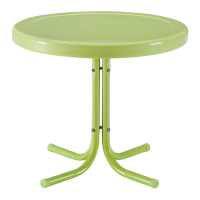
METAL SIDE TABLE
CO1011A
Question and Answer IconNeed help?

Do you have a question about the Crosley CO1011A and is the answer not in the manual?

Summary

Parts and Hardware List

Part List

Details of the components included in the furniture set, such as the top, legs, and connectors.

Hardware List

Enumeration of all fasteners and tools provided for assembly, including bolts, nuts, washers, and wrenches.

Assembly Instructions

Step 1: Attach Table Legs

Instructions for attaching the table legs to the tabletop using bolts, washers, and nuts.

Step 2: Insert Leg Connector

Guidance on inserting the leg connector into the center of the legs and securing it with bolts.

Step 3: Final Tightening and Setup

Procedure for aligning parts, fully tightening all connections, and preparing the table for use.

Limited Manufacturers Warranty

Summary

Parts and Hardware List

Part List

Details of the components included in the furniture set, such as the top, legs, and connectors.

Hardware List

Enumeration of all fasteners and tools provided for assembly, including bolts, nuts, washers, and wrenches.

Assembly Instructions

Step 1: Attach Table Legs

Instructions for attaching the table legs to the tabletop using bolts, washers, and nuts.

Step 2: Insert Leg Connector

Guidance on inserting the leg connector into the center of the legs and securing it with bolts.

Step 3: Final Tightening and Setup

Procedure for aligning parts, fully tightening all connections, and preparing the table for use.

Limited Manufacturers Warranty

Crosley CO1011A Specifications

General IconGeneral
BrandCrosley
ModelCO1011A
CategoryIndoor Furnishing
LanguageEnglish

Related product manuals